Too Busy to Learn AI? Your Team Does Not Need a Course

Key Takeaways
- You do not need to learn AI. The AI needs to learn your business, and that takes about 1 minute from your website.
- 6 steps: type your website, check what it learned, invite your team, connect your tools, approve each email and invite, hand tasks to teammates.
- Start with one repeat job, such as the promises your team makes each week. Run it for 2 weeks.
- Memox drafts each email and invite. You approve each one before it goes.
It is 6 pm, you still have 40 emails to answer, and the AI course you bought sits unopened. Too busy to learn AI? You do not need to. AI for a business team does not start with a course. The AI learns your business, and Memox does that from your website in about 1 minute.
Here is the whole plan in one list:
- Type your website into the Memox app.
- Check what it learned and fix any fact that is wrong.
- Invite your team and let them ask in plain words.
Everything else in this post is detail on those 3 moves. You can stop reading here and start. If you want the full plan, the steps, the first jobs and a first week of 10 to 15 minutes a day, keep going.
Why most AI advice does not fit a team
Most advice on how to use AI in a business begins with "learn to write good prompts". A prompt is the instruction you type. Writing good ones is a skill. Skills take time.
Now count the cost for a team of 12. Each person learns the skill. Each person then explains the business to the AI from zero: the prices, the refund rule, the delivery times, the names of the suppliers. Each person does it a little differently. You get 12 half-informed assistants and 12 sets of habits.
Three things go wrong in a team.
There is no time. A busy head of operations cannot spend 20 hours on a course. A course is also the first thing to drop when a customer calls.
One tool for each person. When each person has a private AI chat, the business knowledge lives in 12 places. The new hire starts from nothing. When someone leaves, their setup leaves too.
The AI does not know the business. A general AI chat knows a lot about the world. It does not know your price rules or your Friday cut-off. So the team spends its time pasting context into the chat.
The fix is to turn the problem around. The business is taught once. The team only asks. If you want the longer argument about one assistant for each person versus one for the team, read AI assistant for business: one for each person, or one for the team?. This post is the practical start.

What "the AI learns your business" means
The phrase sounds large. In practice it is small and concrete.
When you type your website into the Memox app, the app reads your public pages. It learns what your business does. It takes about 1 minute. You do not fill in a form.
That reading becomes the starting knowledge for the whole company. It sits in one place. Every person you invite uses the same knowledge.
Then the knowledge grows in two ways:
- You add facts. One line is enough: "We do not deliver on Sundays."
- You connect your tools. Mail, calendar, files and your store hold facts too. Memox answers from them when you ask.
Compare that with a course. A course teaches a person a method. Memox gives the whole team the business itself. The method is plain language. If you can ask a colleague a question, you can ask Memox.
This is also why the first week below is short. Most of the work is a one time reading of your site and a few corrections.
How to start AI in your team: 6 steps
This is the core of the post. Each step is one bounded action. Do them in order.
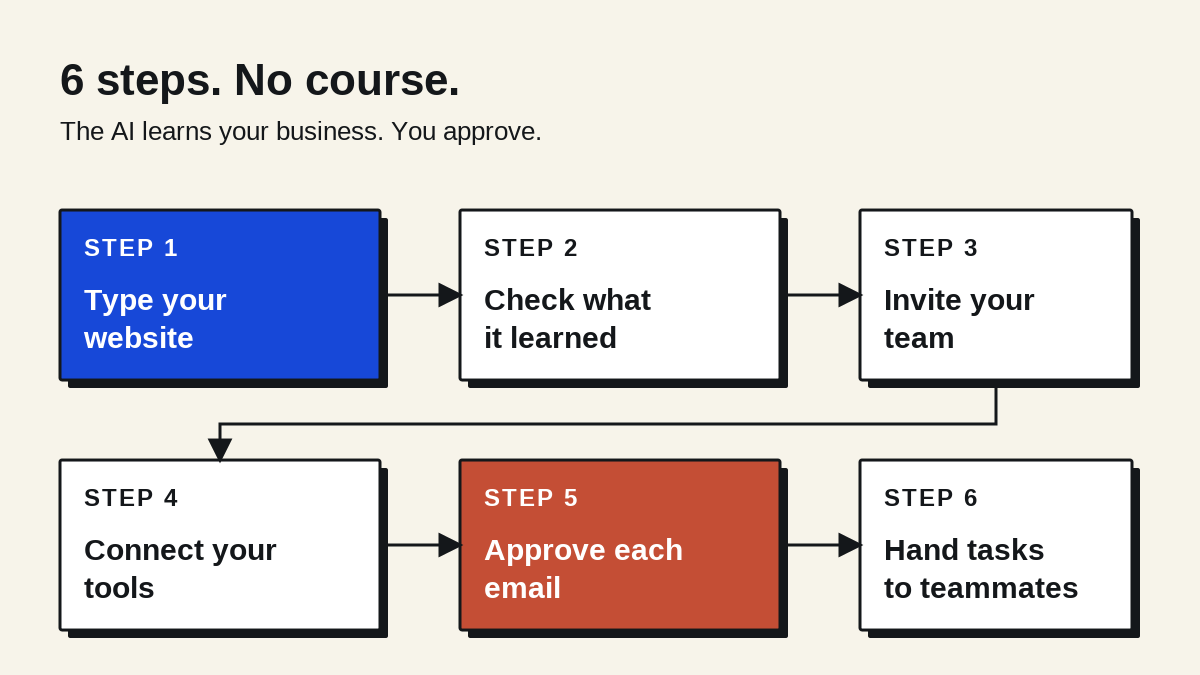
Step 1: Type your website
Open the Memox app on your iPhone, Android phone or in the browser. Type your website address.
The app reads your site and learns what your business does. It takes about 1 minute. That is the whole setup for day one. No templates. No forms.
Step 2: Check what it learned and fix it
Ask it 5 questions you already know the answers to. It takes about 3 minutes.
Look for three kinds of error: a price that changed, a service you no longer offer, and a rule that is in your head but not on your site. Add the right fact as one plain sentence. For example: "We close at 4 pm on Fridays."
This step matters more than any other. The AI is only as good as the facts it holds. A wrong fact fixed now saves a wrong answer later.
Step 3: Invite your team
Add your people. Each person gets the same business knowledge.
There are 3 roles: owner, admin and member. Each person keeps a private chat, so a teammate can ask a rough question without an audience. Raw emails and file text stay private to the person who connected them.
Nobody takes a course. A new hire opens the app and asks, "How do we handle a late delivery?" The answer comes from your business, not from the internet at large.
Step 4: Connect mail, calendar, files or your store
Memox answers from your mail, calendar, files and store. For that, it connects to the tools you already use.
11 apps connect: Outlook mail, Outlook Calendar, OneDrive, Gmail, other email (IMAP and SMTP), Shopify, GitHub, Jira, HubSpot, Slack and Google Chat. The Memox team sets up each connection hands-on with you. You do not follow a technical guide alone.
Connect one tool first. Most leaders start with mail. See the full list on the Universe page.
Step 5: Approve before it goes
AI should not act alone on things that matter. In Memox it does not.
Memox drafts the email or the invite. You see it. You approve each one before it goes. If it is wrong, you change it or say no. It does not send on its own.
This one rule removes most of the fear. You stay the person who decides. The AI saves you the typing.
Step 6: Hand tasks to teammates
Now use it for work. Type one line: "Ask Hana to check the Friday stock."
Hana gets a push on her phone. A board shows who has what. The task has a name on it. You can also run routines and morning check-ins, so the same jobs run each day. Read more about the app on the Memox app page.
6 first jobs for a team that is too busy
Pick one job. Run it for 2 weeks. Then pick the next. The table shows what to type, what you get and what it costs you in time.
| Job | What you type | What you get | Your time |
One brain for your company.
It answers your customers, your phone and your team. Book a call: we answer your questions live, on your own website.
| --- | --- | --- | --- | | Answer the weekly questions | "What is our refund rule?" | An answer from your business knowledge | 1 minute | | Draft a reply | "Draft a reply to the quote request from Dana" | A draft email you approve | 2 minutes | | Find a file | "Find the price list we sent in May" | The file, from your connected files | 1 minute | | Hand off a task | "Ask Hana to check the Friday stock" | A task with an owner on the board | 30 seconds | | Run a morning check-in | "Run my morning check-in" | Your check-in, as a daily routine | 2 minutes | | Ask about the shop | "Which orders are waiting to ship?" | An answer from your store data | 1 minute |
The shop row works for a Shopify store. The Memox team connects the store with you.
The list of promises
Start with promises if you cannot decide. Your team makes dozens each week.
- "I will send you the quote on Tuesday."
- "We will check the stock and call you back."
- "I will ask the supplier."
Most are spoken or typed in a chat. Many are forgotten. A forgotten promise costs trust.
Turn each promise into a task. Type one line, such as "Ask Omar to send the quote on Tuesday". Omar gets a push, and the board shows who has what. If the promise needs an email, Memox drafts it and you approve it.
This is not a big project. It is a place where a promise has an owner. For a team, that alone changes how the week feels.
Book a 30-minute call. We look at where your leads and customer questions come from today. We show Memox answering on your own website, live on the call. You leave with a plan: what we set up first and which of your tools we connect. Book the call
How to pick your first job
If no job stands out, use this checklist. Score each candidate job against the 5 checks. Pick the job with the most yes answers.
| Check | Why it matters |
|---|---|
| The job repeats each week | A repeat job shows a result in days, not months |
| One person can own the result | A job with no owner stops after week 1 |
| You know the right answer | You can see at once if the AI gets it wrong |
| A mistake is easy to fix | A low risk job lets the team learn without fear |
| It costs at least 30 minutes a week now | The time you save is large enough to notice |
Say an operations lead has three candidates: answers to staff questions, quote follow-ups and the monthly stock count. Staff questions pass all 5 checks. Quote follow-ups pass 4, because a wrong quote is harder to fix. The stock count passes 2, because it happens once a month. She starts with staff questions and adds quote follow-ups in week 3.
Write the first job on one line and share it with the team: "For 2 weeks, ask Memox before you ask a colleague." One clear rule beats a long guide.
Three leaders, three first weeks
These are examples, not customer results. The businesses are invented. The numbers are made up to show the size of the job.
A bakery chain with 6 shops
Say the operations lead visits one shop at 5 am and another at 9 am. The shop staff ask her the same things all day: "Do we do a gluten free option for cakes? What is the order cut-off for wedding cakes?"
On day 1 she types the bakery website. Memox reads the menu and the order page. On day 2 she finds that the cake lead time on the site is 3 days, but the real rule is 5 days. She fixes it with one line.
By day 3 the shop staff ask Memox instead of calling her. Say she was answering 15 such questions a day. Now most go to the app. When staff find a wrong or missing answer, they tell her, and she adds the fact.
A 60 person electrician firm
Say the head of dispatch also runs the office. Quotes go out late because he is on the phone. Customers chase.
His first job is the promise list. Each time he tells a customer "we will send the quote by Wednesday", he types one line in the Memox app. The task has an owner. Each morning, the board shows what is still open.
On day 3 he connects Outlook mail. He asks for a draft of the quote follow-up. He changes 1 line and approves it. The quote goes out the same hour. The work he used to do at night now happens in a gap between two calls.
An online store with 40 staff
Say the head of support at a home goods store works from a shared inbox. The same questions come every day: where is my order, can I change the address, what is the return window.
Her team connects Shopify and Gmail, with the Memox team doing the setup. A teammate asks, "Which orders from this week are still unshipped?" and gets an answer from the store data. Another asks for a draft reply to a return question. The head of support approves each draft.
After 2 weeks she sees which questions repeat most. That list tells her what to put on the website. The AI work and the website work feed each other.
A first week that fits a busy leader
You do not need to block a day. Use small slots of 10 to 15 minutes. After day 5, you know if this works for your business.
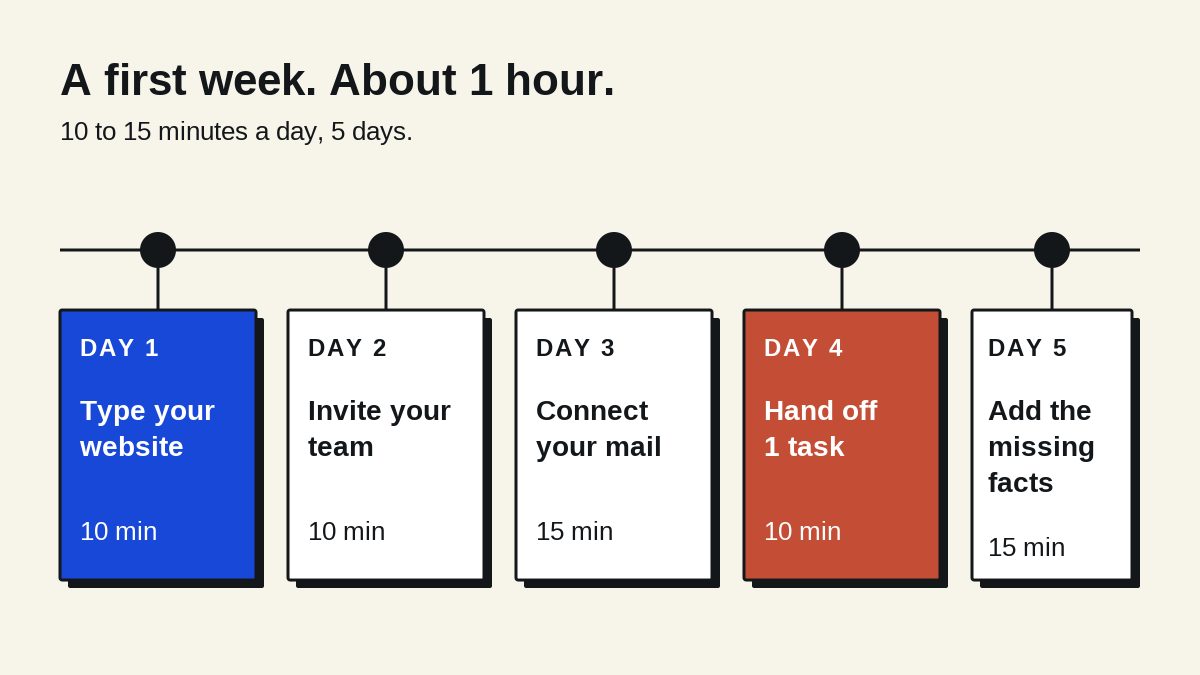
Day 1, 10 minutes. Type your website. Read what Memox learned. Fix any fact that is wrong.
Day 2, 10 minutes. Invite your team. Ask each person to ask 1 real question from their day.
Day 3, 15 minutes. Connect your mailbox with the Memox team. Ask Memox to draft 1 reply. Approve it.
Day 4, 10 minutes. Hand off 1 task with one line. Check the board with your team.
Day 5, 15 minutes. List the questions Memox could not answer. Add those facts in plain words.
That adds up to about 60 minutes across the week. It is an hour you would spend on one long meeting.
Do not add more jobs in week one. Depth beats breadth. One job that works teaches the team more than five jobs that half work.
What it costs and what to expect
Each setup is hands-on, so we price it to your business. You get a clear quote after the call. You see the result before you pay.
What to expect is simple.
The first week will not be perfect. Some answers will miss a fact. That is useful. Each miss tells you what to add.
The AI will not run your business. It removes small stops: the question nobody could answer, the task nobody owned, the email nobody drafted.
The people stay in charge. Every email and invite waits for your approval.
If you want the longer reasoning on shared business knowledge, read AI knowledge management for a team. If you are choosing between systems for storing answers, read internal knowledge base software: 7 questions.
Beyond the team: the same brain faces your customers
Everything above is about your own people. The same brain also works for the people who contact you.
Memox is one brain for the company. The website chatbot, the voice agent, the CRM, handoff to your team and the Memox app all run on it. Teach it once and the same facts serve everyone.
- The website chatbot answers visitors day and night from your knowledge. It captures the visitor's name and contact. It goes on your site with 1 line of code.
- The voice agent picks up your business line in seconds, day and night, and answers from the same knowledge.
- The CRM turns every chat and every call into a contact with a stage and a timeline. Nobody types it in.
- Handoff passes a chat to a person when a visitor needs one. The visitor sees "A rep has been asked", and the rep gets a push and an email.
You do not need these on day one. The platform view is on the Platform page. For a real example of the chatbot at work, read the ContainerOne case study. In the 30 weeks to 27 Apr 2026, ContainerOne's chatbot had 797 chats and 734 leads. The AI alone handled 90.6% of the chats, and 75 handoffs each had a rep assigned.
The line to remember: one brain for your company. It answers your customers, your phone and your team.
Common mistakes
Six mistakes slow most teams down. Each has a quick fix.
1. Trying to learn prompts first. A manager spends a weekend on a prompt course. Fix: skip it. Type your website and ask in plain words.
2. Skipping the check of what it learned. The AI repeats an old price. Fix: spend 3 minutes on day 1 and fix each wrong fact in one line.
3. Starting with five jobs. The team spreads thin and sees no clear win. Fix: pick one job, run it for 2 weeks, then pick the next.
4. Keeping it a one person tool. The owner uses it, the team does not. Fix: invite the team on day 2 and ask each person for one real question.
5. Approving without reading. A draft goes out with a wrong detail. Fix: read each draft once. You approve every email and invite, so use that power.
6. Ignoring the questions it could not answer. The same gap appears each week. Fix: on day 5, list the misses and add those facts. Do it again each month.
Your next step
Open the Memox app and type your website address. In about 1 minute, Memox knows what you do. See the whole system on the Platform page. For the questions to ask any AI company, read AI at Expand North Star 2026: questions for a company.
Book a 30-minute call
- We look at where your leads and customer questions come from today.
- We show Memox answering on your own website, live on the call.
- You leave with a plan: what we set up first and which of your tools we connect.
If it fits, our team does the setup with you. We connect your tools, train the brain on your business and hand you a working system. You do not learn AI.
Each setup is hands-on, so we price it to your business. You get a clear quote after the call.
One brain for your company.
It answers your customers, your phone and your team. Book a call: we answer your questions live, on your own website.
Frequently Asked Questions
No. In Memox your team asks in plain words, the way they would ask a colleague. The business knowledge is set up once, from your website.
Spend 10 to 15 minutes a day for 5 days. Type your website, check what Memox learned, invite your team, connect your mail, and hand off one task.
Start with work that repeats: answering the same questions, drafting emails, and tracking promises. Pick 1 job and run it for 2 weeks.
In Memox the AI drafts the email or the invite. You approve each one before it goes. It does not send on its own.
Type your website. The Memox app reads it and learns what your business does in about 1 minute.
Each setup is hands-on, so we price it to your business. You get a clear quote after the call.
The Memox team sets up each connection hands-on with you. Memox connects to Outlook, Gmail, Shopify, HubSpot, Slack and more.