A CRM That Fills Itself: Each Chat and Call Becomes a Contact

Key Takeaways
- A CRM is empty when it depends on people to type. Fill it from the chats and calls that already happen.
- In Memox each chat and each call becomes a contact with a stage and a timeline. Nobody types it in.
- Your HubSpot stays. A 2-way sync is set up with the Memox team, hands-on.
- The handoff uses the CRM to find the customer's own rep.
- Start with the chatbot or the phone line. The CRM fills from both.
A lead calls on Tuesday. Nobody writes it down, and by Friday nobody remembers it. A CRM that fills itself ends this. It turns each chat and each call into a contact with a stage and a timeline. Nobody types it in, so CRM data entry stops for the leads that come through your website and your phone line.
A CRM has a simple job. It should know who your leads are and what happened with each one. Most CRMs fail at the first part, because the software waits for people to type. This guide shows how a CRM that fills itself works, how to start one and how to keep it clean with 15 minutes a week.
Why a CRM is empty: nobody types it in
Think about a busy week. A lead calls, and you take notes on paper. A visitor chats on your site at night. Each of these should become a record. In practice, a few do. The rest stay in a notebook, an inbox or a head.
Sales reps are paid to sell, not to type. A CRM that needs data entry loses to the next call. When the week is full, the record is the first task that drops.
An empty CRM then causes a second problem. It cannot answer the simplest question: who did we talk to, and what did we say? The team stops trusting it. When the team stops trusting it, nobody opens it. The CRM is empty because nobody types, and nobody types because the CRM is empty. It is a loop.
A rule or a reminder does not break the loop. It adds one more task to a full day. The way out is to remove the task, so the talk itself writes the record.
The real cost of CRM data entry
CRM data entry looks small. One note takes 2 minutes. That is why nobody counts it.
Here is an example with invented numbers. Say a sales team has 3 reps. Each rep has 12 talks a day with leads, by chat, phone or email. After each talk, the rep needs 2 minutes to find the contact, pick a stage and write a note.
That is 24 minutes a day for each rep. Across 3 reps it is 72 minutes a day. Over a 5-day week it is 6 hours. This is one working day a week of typing that adds no sale.
Now look at what actually happens. Reps do not spend those 6 hours. They skip the note on 3 talks out of 12, then on 6 out of 12. The cost moves from time to missing data. You pay either way.
The missing data is the larger cost. A lead asks about price on Tuesday night and no one writes it down. On Friday a second rep calls and asks the same questions again. The lead learns that your team does not talk to itself.
So the cost has three parts:
- Time. The minutes that reps spend typing instead of selling.
- Gaps. The talks that never become a record.
- Repeats. The leads who repeat their story to a second rep.
A CRM that fills itself removes all three. The record appears at the end of the talk, whether or not a rep has time.

How a CRM that fills itself works
The idea is simple. The AI already talks to your leads. Memox is one brain for your company, and the website chatbot and the voice agent run on it. The same brain writes the CRM. When the AI finishes a chat or a call, the talk becomes a record.
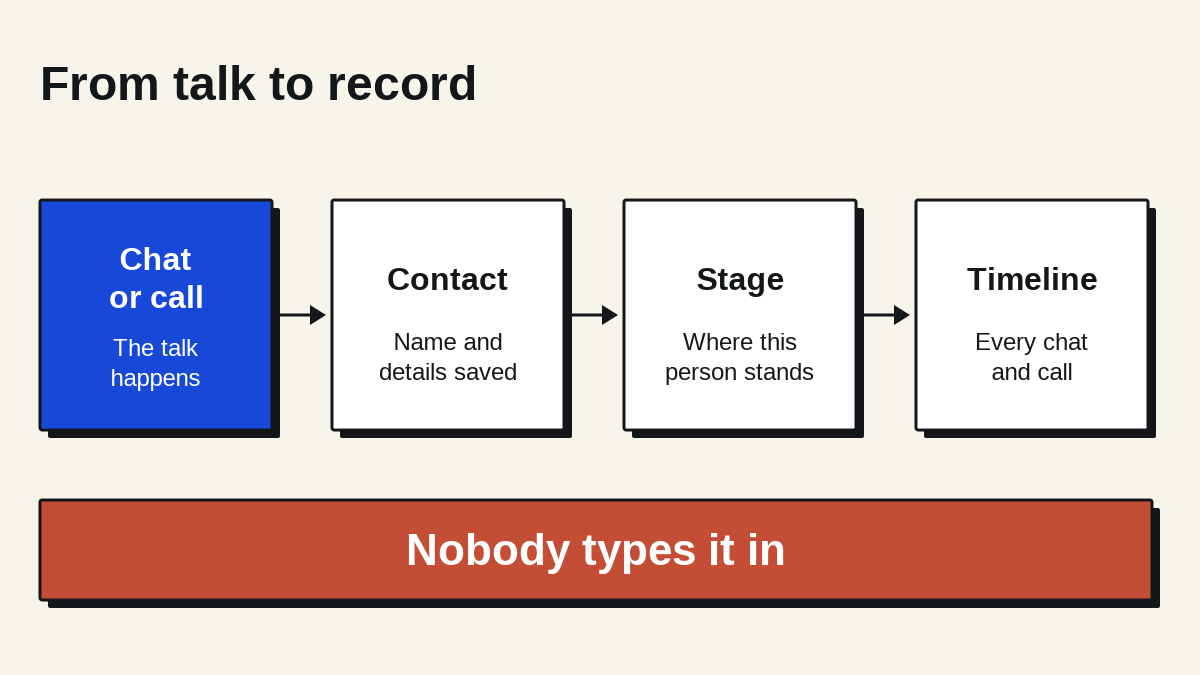
The steps are the same for chat and for calls:
- A talk happens. A visitor chats on your site through the website chatbot. Or a caller phones your line and speaks to the voice agent.
- A contact appears. The chatbot captures the visitor's name and contact. The voice agent keeps the call with a recording and a transcript. Each talk becomes a contact.
- The contact gets a stage. The stage tells your team where this person stands.
- The contact gets a timeline. The first message, the call, the answers the AI gave and the later talks all sit in one place.
What a contact record holds
A contact in the Memox CRM is not a name in a list. It is the whole story of the talk. The table shows what a record holds and where each part comes from.
| Field | Where it comes from | What it gives your team |
|---|---|---|
| Name | Chat: the visitor gives it | Who to ask for |
| Contact details | Chat: the chatbot captures them | How to reach the person |
| Stage | Each contact has one | Where this person stands |
| Timeline | Every chat and every call | The full story in order |
| Chat log | Chat | The exact words, read in full |
| Recording and transcript | Call | What was said, to read or to hear |
| Owner | The rep your team assigns | Who follows up |
Read the "where it comes from" column. Most rows come from the chat or the call. Only the owner needs a person, and that is where a person adds judgment. Judgment is a good use of a rep's time. Copying a phone number is not.
Manual CRM versus a CRM that fills itself
Both kinds of CRM store contacts. The difference is who writes the record. In a manual CRM a person types after each talk. In a CRM that fills itself the talk writes the record.
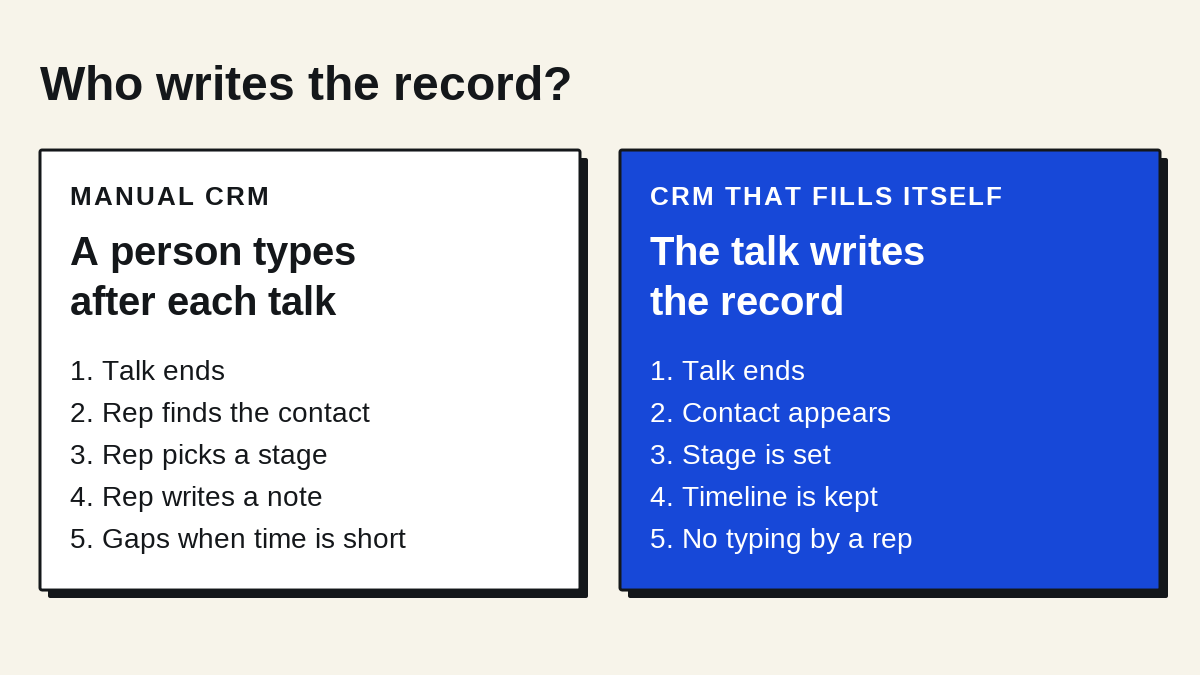
The table compares them on the points that matter to a head of sales.
| Point | Manual CRM | CRM that fills itself |
|---|---|---|
| Who creates a contact | A rep, if there is time | The chat or the call |
| What happens at 11 pm | The lead waits for morning and may be lost | The AI answers and the contact is saved |
| Quality of notes | Short, late, different for each rep | The full chat or call, the same way each time |
| Rep time on data entry | Minutes after every talk | None for chats and calls |
| Missed leads | Common when the week is busy | Each chat and call is kept |
| Second rep picks up | Asks the lead to repeat | Reads the timeline first |
| Trust in the data | Falls as gaps grow | Grows because the record is complete |
A CRM that fills itself does not remove the rep. It removes the typing. The rep still decides, calls and closes.
One brain for your company.
It answers your customers, your phone and your team. Book a call: we answer your questions live, on your own website.
Your HubSpot stays
Many teams already have a CRM. You may use HubSpot. You do not have to move.
Memox keeps a 2-way sync with HubSpot. The Memox team sets the sync up hands-on with you.
The same is true for the other apps. 11 apps connect to Memox: Outlook mail, Outlook Calendar, OneDrive, Gmail, other email (IMAP and SMTP), Shopify, GitHub, Jira, HubSpot, Slack and Google Chat. You keep the tools you use. Memox connects to them.
Your sales team keeps the tool it already uses. For a deeper look at the chat side of this link, read Chatbot CRM integration.
The handoff uses the CRM
The CRM does more than keep a list. It tells the AI who owns a customer.
A handoff moves a talk from the AI to a person. When handoff to your team picks a rep, it tries the customer's own rep from the CRM first. A returning customer who asks for a person reaches the rep who knows the account, not a stranger. For all 4 steps of the handoff, read human handoff from AI chat.
Step by step: start a CRM that fills itself
You do not need a project plan. You need one source, a few stages and a weekly check. This takes an afternoon to set up and a short review after the first days.
- Pick the source. Start with one: the website chatbot or the phone line. Choose the one where you lose more leads today. The CRM fills from both, so you can add the second later.
- Agree what each stage means for your team. Write one line for each stage: what a rep does next when a contact is there. Then every rep reads a stage the same way.
- Decide who owns a new contact. Name one person or one team. A contact without an owner sits still. Add the customer's own rep when you know it.
- Connect HubSpot with the Memox team, if you use it. The team sets up the 2-way sync with you. Bring the name of the person who knows your HubSpot.
- Review the first 20 contacts. Read each timeline. Check the name, the contact details, the stage and the answers the AI gave. This takes about an hour and tells you more than any setup screen.
- Fix the knowledge. Where the AI gave a weak answer, add the missing fact to the knowledge: a price rule, a policy, the answer your team gives. Then the next chat is better.
Book a 30-minute call. We look at where your leads and customer questions come from today. We show Memox answering on your own website, live on the call. You leave with a plan: what we set up first and which of your tools we connect. Book the call
Worked examples
The three businesses below are invented. They show how the same idea fits different work. The numbers are examples, not results.
A solar installer
Say a 90-person solar installer gets most leads from its website. Visitors ask about roof size, price rules and how long an install takes. The office is closed after 5 pm.
The chatbot answers from the installer's knowledge and captures names and contact details. At 9 pm a homeowner asks about a roof with two angles. The chatbot answers from the price rules and asks for a phone number. The contact is saved.
At 8 am the office manager opens the contact list. Two new contacts wait with full chat logs. She assigns each to a rep. The rep calls with the answers already in hand. No one typed a line.
A wholesaler
Say a food wholesaler has 4 reps and a phone line that rings all day. Most calls ask about stock, delivery days and order sizes. Reps are on the road, so notes happen late or never.
The voice agent picks up the line in seconds and answers from the same knowledge. When a caller needs a person, the call goes to a follow-up list with a status. Each call becomes a contact with a recording and a transcript.
A rep finishes a delivery run at 4 pm and opens the follow-up list. She sees 6 callers who asked for a person. She reads the transcripts in a minute each and calls back, starting with the oldest. The notebook in her van is empty because it is not needed.
An agency
Say a 60-person agency has one managing partner who sells and one account lead for each client. Existing clients also chat on the site when they have a question. The account leads work in HubSpot.
The Memox team connects HubSpot with the agency in a hands-on session. A client chats and asks for a person. The CRM knows the client's own account lead, so that lead is asked first. The client sees "A rep has been asked".
The lead's first reply takes over the chat. The managing partner reads the timeline later and sees the whole talk.
A day with a CRM that fills itself
Take the solar installer again and follow one contact through one day.
- 9:00 pm. A visitor asks about delivery of panels and install dates. The chatbot answers and captures a name and an email. A contact appears with a stage and a timeline.
- 8:00 am. The office manager opens the new contacts and assigns this one to a rep.
- 8:10 am. The rep reads the full chat log. She sees each question and each answer the AI gave.
- 8:20 am. She calls with the answer in hand. She does not ask the person to repeat anything. Then she moves the stage. That is the only typing in the day.
What to measure
A CRM that fills itself should change your week. Pick a few numbers and read them each week. They come from your own data, so you need no survey.
| Measure | Why it matters | How often |
|---|---|---|
| New contacts | Shows how many leads the chat and the phone line bring in | Each week |
| Contacts by stage | Shows where your leads stand | Each week |
| Contacts with no next step | Shows leads that sit still and risk being lost | Each week, at the review |
| Handoffs | Shows how many talks need a person, and whether a rep was assigned | Each week |
Read them together. Many contacts with no next step means the owner rule from step 3 is weak. Many handoffs on one topic means the knowledge has a gap.
For scale: ContainerOne, an online container dealer, had 797 chats and 734 leads from the Memox website chatbot in the 30 weeks to 27 Apr 2026. There were 75 handoffs, each with a rep assigned. Read the ContainerOne case study.
CRM hygiene with less work
A CRM that fills itself still needs a little care. Less care, not none. A weekly review of 15 minutes is enough. Put it in the calendar at the same time each week.
Use this routine:
- Open the new contacts. Read the last 5 timelines. Check that the AI gave good answers. (3 minutes)
- Find the contacts with no next step. Give each one an owner or a stage. Close the ones that are dead. (5 minutes)
- Check the handoffs. Confirm that each had a rep assigned. Note any topic that came up often. (3 minutes)
- Fix one gap in the knowledge. Add the missing price rule, policy or answer. (3 minutes)
- Write one line. Note what changed since last week. (1 minute)
Do the routine on a fixed day. Skip a week, and the gaps return.
Where this fits: one brain for your company
The CRM is 1 of 5 Memox products on one brain, with the website chatbot, the voice agent, handoff to your team and the Memox app. When you fix a fact once, every part uses it. That is why the CRM and the other products belong together. To see how they connect, read about the platform or open the universe. For the idea behind it, read What is a company brain. To see how the phone side works, read AI voice agent for inbound calls.
Common mistakes
- Waiting for reps to type. A rule to type more does not work in a busy week. Fix it by filling the CRM from the chat and the call.
- No shared meaning for each stage. Two reps read the same stage in two ways. Fix it by writing one line for each stage: what a rep does next.
- No owner for a new contact. A contact that no one owns sits still. Fix it by naming an owner or a team before the first contact arrives.
- Skipping the review of the first 20 contacts. You miss weak answers and wrong stages. Fix it by reading the first 20 timelines in one hour.
- Blaming the CRM for a knowledge gap. If a record shows a poor answer, the CRM is not at fault. Fix it by adding the missing fact to the knowledge.
- Running two sources of truth. If HubSpot and Memox drift apart, the team picks one and ignores the other. Fix it by setting up the 2-way sync with the Memox team from day one.
- Never reviewing. A CRM left alone slowly fills with dead contacts. Fix it with the 15-minute weekly review.
Next step: start with the chatbot or the phone line
The CRM fills from your chats and your calls. Add the website chatbot with 1 line of code from the Embed tab, or put the voice agent on a new number or your own. Then open the CRM to see a list that nobody typed. To hear the voice agent first, call +1 (573) 490-0128 or call in the browser on the demo page.
Book a 30-minute call
- We look at where your leads and customer questions come from today.
- We show Memox answering on your own website, live on the call.
- You leave with a plan: what we set up first and which of your tools we connect.
If it fits, our team does the setup with you. We connect your tools, train the brain on your business and hand you a working system. You do not learn AI.
Each setup is hands-on, so we price it to your business. You get a clear quote after the call.
One brain for your company.
It answers your customers, your phone and your team. Book a call: we answer your questions live, on your own website.
Frequently Asked Questions
It is a CRM where contacts come from your chats and calls, not from typing. In Memox each website chat and each call becomes a contact with a stage and a timeline.
An AI CRM uses AI to collect and organize contact data for you. In Memox the AI answers the chat or the call, and that talk becomes the contact record.
In Memox a call that needs a person goes to a follow-up list with a status, and a chat that needs a person goes to a rep. The CRM tells the AI which rep owns the customer.
Let the AI capture every chat and call as a contact, then review the first 20 contacts and fix the knowledge where answers were weak. Repeat a short review each week.
No. Memox keeps a 2-way sync with HubSpot. The Memox team sets it up with you, so your sales team keeps the tool it already uses.
They do not have to feed it. The chats and calls fill it. A rep opens a contact and sees what happened, instead of typing notes.
Start with the website chatbot or the voice agent. The CRM fills from both, so you do not need to import anything first.