Internal Knowledge Base Software: 7 Questions Before You Choose

Key Takeaways
- An internal knowledge base is one shared place where your team finds the answers about your business. Choose it with 7 questions, scored 0 to 2.
- A shared folder is enough for a team of fewer than 5 people with few documents. After that, plain-word questions and one source of truth matter.
- Set-up time is the hidden cost. A tool that nobody fills in stays empty, so favor tools that learn from what you already have.
- Score the types of tool first. Then test 2 tools with the same 10 real questions in 15 minutes and count the right answers.
A new hire asks where the refund rule is. Three people give three answers, and one of them is out of date. An internal knowledge base fixes this. It is one shared place where your team finds the answers about your business. It holds prices, policies, how-to steps and the replies your best people give. The right internal knowledge base software lets anyone ask a plain question and get the same correct answer.
Here is how to choose in one list. Ask 7 questions about any tool:
- Can the whole team ask it in plain words?
- Does it answer from your knowledge, with a source?
- How long does set-up take, and who does it?
- Who can see what?
- What does it cost for the whole team?
- Does it connect to your tools?
- Can you leave and take your knowledge with you?
Score each question from 0 to 2. Add the scores. This guide shows how, with examples, a test and a plan.
Do you need one?
A shared folder can be enough. If you have fewer than 5 people and a small set of documents, keep it simple. Name the files well and move on.
You need software when 3 things are true:
- The team asks the same questions each week.
- The answers live in different inboxes, chats and documents.
- One or two people are the only ones who know.
The third sign is the sharpest. Picture the one person who knows every supplier, every discount rule and every exception. Now picture that person on holiday. If work slows down, you have a knowledge problem, not a software problem. Software only helps if it moves that knowledge out of one head and into a shared place.

The four kinds of tool
Most products fall into four kinds. Brand names change often. The kinds stay the same. Compare the kinds first, then compare products inside the kind that fits.
| Kind | How you find an answer | Who keeps it current | A customer question |
|---|---|---|---|
| Shared folder | Open folders, guess the file name, read the file | Whoever last edited it, if anyone | A person reads the file, then replies by hand |
| Wiki tool | Search pages by keyword, then read | The page authors, when they have time | A person finds the page, then replies by hand |
| Help-desk knowledge base | Search articles written for customers | The support team | Customers read articles. Staff rules stay elsewhere |
| AI knowledge base | Ask a question in plain words, get an answer | The owner of each fact | The same knowledge can answer customers too |
The folder wins on cost and simplicity. The wiki gives you full control over every page, but someone must write and tidy the pages. The help-desk kind serves customers well, but it is built for public articles, not for your internal rules. The AI kind wins on speed of answers, because a person asks instead of searching.
Notice the last column. Many teams forget it. The people who ask your team questions are not only staff. Customers ask the same things on your website and on the phone. If your knowledge lives in a tool that only staff can use, you will write every answer twice: once for the team, once for the customer. Read more on this idea in AI knowledge management for a team.
The 7 questions
Each question below has three parts: why it matters, what a good answer sounds like, and a red flag.
1. Can the whole team ask it in plain words?
Why it matters. This question decides if people use the tool. A search box needs the right keyword. A person who searches "refund policy" finds nothing if the page is called "returns and credits".
A good answer. Anyone types a normal question, such as "How long do we have to refund a damaged item?", and gets a direct answer. Two people asking in different words get the same answer.
Red flag. The vendor says staff must learn the tool's own search commands, or the answer changes with who asks. If each person must teach the tool the business first, answers will differ from desk to desk.
2. Does it answer from your knowledge, with a source?
Why it matters. A confident wrong answer is worse than no answer. Staff will repeat it to customers.
A good answer. The tool answers from your own pages, files and website. It shows where the answer came from, so a person can check it. When your knowledge does not cover the question, it says so and does not guess.
Red flag. The tool answers anything, even a question about a supplier it has never heard of. That means it fills gaps from general knowledge. Test it with a question only your business can answer, such as which supplier ships slowest. Then test it with a question where you already know the right answer.
3. How long does set-up take, and who does it?
Why it matters. Set-up time is the hidden cost. A tool that needs two weeks of page writing stays empty, because nobody has two spare weeks.
A good answer. The tool learns from what you already have, such as your website, your policies and your documents. One person sets it up for the whole team. Day 1 already gives a useful first answer.
Red flag. Each person must build their own space. Or the demo shows a full library that took the vendor a month to write. Ask to see a library built from scratch, in front of you, in under an hour.
4. Who can see what?
Why it matters. A shared tool must still keep some things private. Payroll rules and a founder's mailbox are not for everyone.
A good answer. The tool has roles, such as owner, admin and member. Each person has a private chat. You control which files and mailboxes feed the shared knowledge, and the tool keeps raw private content with the person who connected it.
Red flag. One shared login for the whole team, or no way to see who can read which page.
5. What does it cost for the whole team?
Why it matters. A price for one seat tells you little. A team of 40 pays 40 times, plus extras.
A good answer. The vendor states the price for each person each month, the minimum number of seats and what the AI part costs. You can work out your bill for 10 more people without a sales call.
Red flag. The price depends on a "talk to us" call, or the AI part is a separate add-on that doubles the bill. Get the price in writing.
6. Does it connect to your tools?
Why it matters. Knowledge lives in email, calendars, files and shop systems. A knowledge base that cannot see them forces people to copy and paste.
A good answer. Check every tool you use against the vendor's own list. Ask who sets up each connection. A good vendor does it with you.
Red flag. The vendor says "that connection is on the way" or hands you a guide and leaves. Test each tool you need, not the tools on the logo wall.
7. Can you leave?
One brain for your company.
It answers your customers, your phone and your team. Book a call: we answer your questions live, on your own website.
Why it matters. Your needs will change. Knowledge that you cannot take out is a risk.
A good answer. You can export your knowledge, in a format a person can open, and you know who owns it. The answer is in the contract, not in a chat.
Red flag. The vendor cannot say what the export looks like. Or the export is a pile of files with no structure.
Score the 7 questions
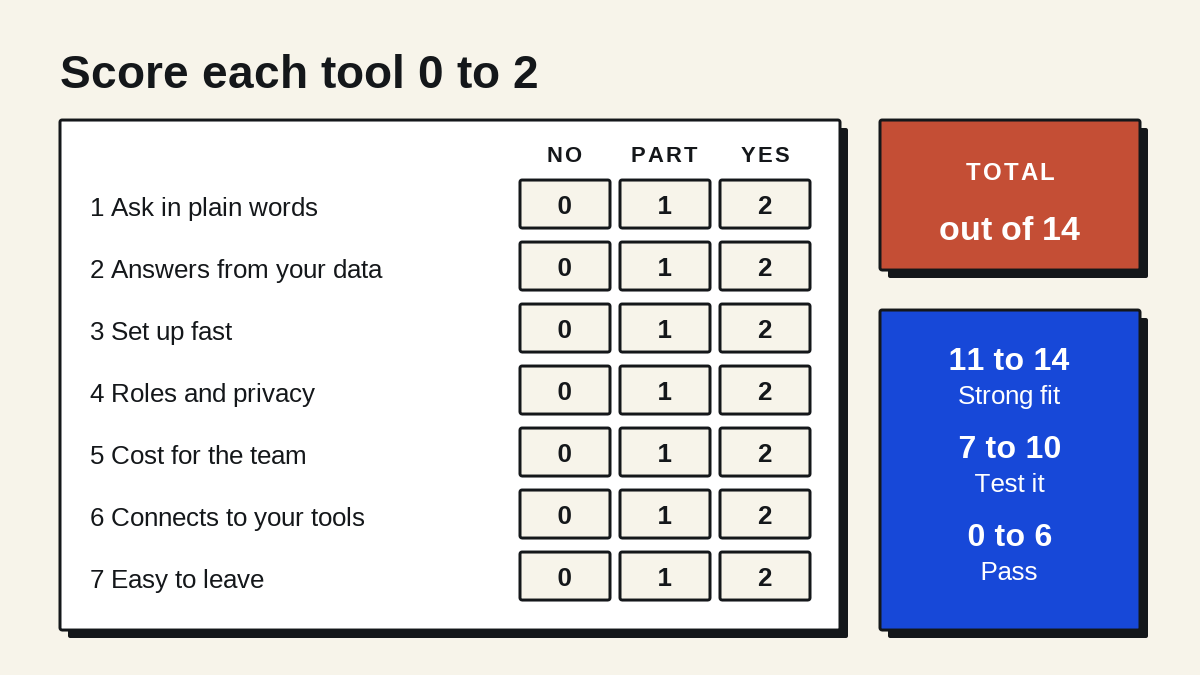
Use a simple scale for each question. A score of 0 means no. A score of 1 means partly. A score of 2 means yes, shown in a test. Add the 7 scores. The best total is 14.
Here is a starting point for the four kinds of tool. It is general. Your own tests matter more than this table.
| Question | Shared folder | Wiki tool | Help-desk knowledge base | AI knowledge base |
|---|---|---|---|---|
| 1. Ask in plain words | 0 | 0 | 1 | 2 |
| 2. Answers from your data | 0 | 1 | 1 | 2 |
| 3. Fast set-up | 2 | 0 | 1 | 1 |
| 4. Roles and privacy | 1 | 1 | 1 | 2 |
| 5. Low cost for a team | 2 | 1 | 1 | 1 |
| 6. Works with your tools | 0 | 1 | 1 | 2 |
| 7. Easy to leave | 2 | 2 | 1 | 1 |
| Total of 14 | 7 | 6 | 7 | 11 |
How to read a total
A total of 11 to 14 means a strong fit. Run the test below and move ahead. A total of 7 to 10 means test it. The tool may fit, but one question is weak. Find the 0 scores and ask the vendor about each. A total of 6 or less means pass.
Also look at single scores. A 0 on question 2 or question 4 can end the search alone. A wrong answer or a privacy leak costs more than a slow set-up.
Book a 30-minute call. We look at where your leads and customer questions come from today. We show Memox answering on your own website, live on the call. You leave with a plan: what we set up first and which of your tools we connect. Book the call
How to create and structure an internal knowledge base
You do not need a large project. A team of 10 to 50 can start in one afternoon. Follow these steps.
- List the 20 questions. Ask each person for the 3 questions they answer most often. Merge the duplicates. Stop at 20.
- Pick one owner for each answer. The owner is the person who knows the fact best, not the person with the most time. One name for each answer.
- Write one short answer for each question. Two to five sentences. Put the rule first, then the exception. Add a number or a date where it helps.
- Title each answer as the question. Use "How long do we have to refund a damaged item?" and not "Refund policy". A person finds it with the words they already use.
- Group by the job, not by the department. Use groups such as "Selling", "Delivering", "Paying" and "Working here". A new hire thinks in jobs.
- Store everything in one place. Not three. If an answer lives in two places, one copy will be wrong in a month.
- Add a review date. Set a date on each answer. Prices and policies change, and an old answer does damage.
- Test with the team. Ask 5 people to find 5 answers without help. Fix each answer that fails.
A few rules keep the structure healthy. Keep one fact on one page. If a price appears in 6 places, one of them will be old. Link to the fact. Do not copy it.
Keep pages short. A long page hides the answer. Split it when it covers two topics.
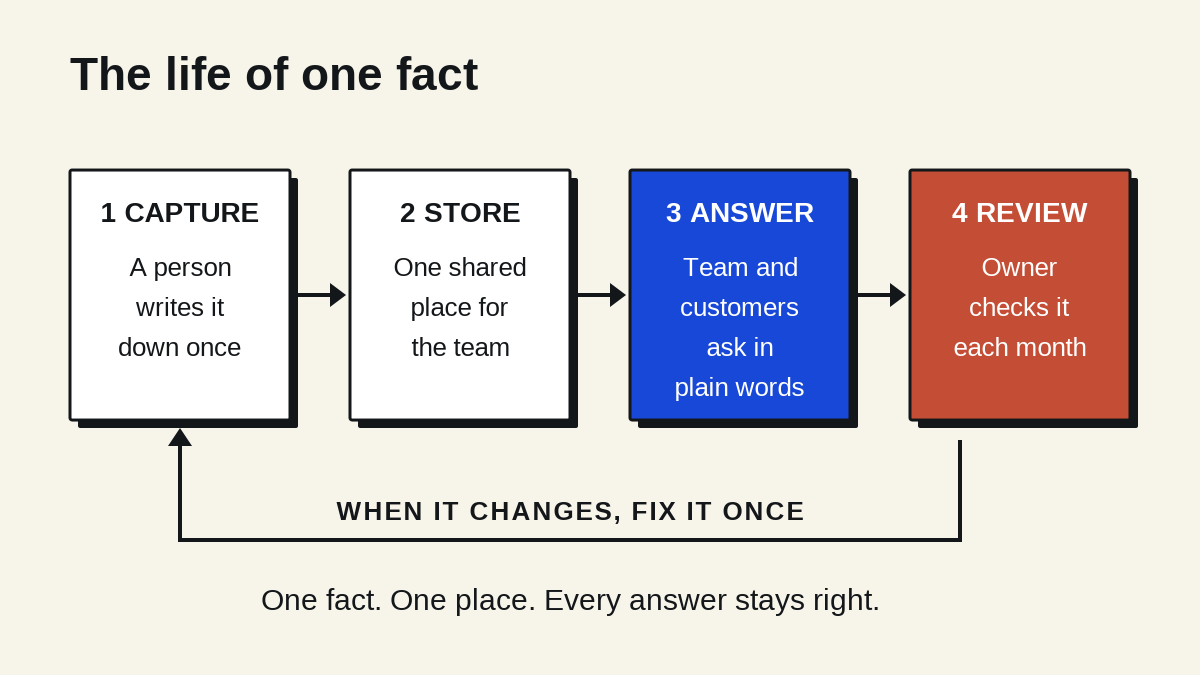
The diagram shows the life of one fact. A person writes it down once. The tool stores it in one shared place. The team and, if the tool allows it, customers ask and get the answer. The owner reviews it each month. When the fact changes, the owner fixes it once, and every answer is right again.
The review step is the one teams skip. A knowledge base is not a project that ends. It is a habit. Set a monthly 20 minute slot. The owner of each answer reads it, fixes it or confirms it. Without that slot, the tool slowly fills with old facts, and people stop trusting it.
The 15-minute test
Do not trust any score until you test. This test works on any tool, of any kind.
- Pick 2 tools.
- Write down 10 real questions your team asked last week. Take them from chats and emails, not from your imagination.
- Give both tools the same knowledge. Use the same website, the same documents.
- Ask the 10 questions in plain words, as a busy person would.
- For each answer, mark it right, partly right or wrong. Check that it shows a source.
- Ask 2 questions your knowledge does not cover. A good tool says it does not know.
- Count the right answers and the minutes of set-up.
The tool with more right answers and fewer minutes wins. A tool that makes up answers to the 2 unknown questions loses, even if it scores well elsewhere.
Show the result to your team. Ask which tool they would open on a busy Monday.
Two worked examples
These are invented teams. The numbers are an example of the method, not results from real firms.
Example 1: a 14-person accounting firm
The firm has 14 staff and one office manager who knows every deadline, fee and client rule. Clients ask the same questions by email. Staff ask the office manager.
The firm scores two options.
- Shared folder: question 1 scores 0, question 2 scores 0, question 3 scores 2, question 4 scores 1, question 5 scores 2, question 6 scores 0 and question 7 scores 2. The total is 7.
- AI knowledge base: question 1 scores 2, question 2 scores 1, question 3 scores 2, question 4 scores 2, question 5 scores 1, question 6 scores 1 and question 7 scores 1. The total is 10.
A total of 10 means test it. The weak spots are question 2 and question 6. Say the firm asks 10 real questions in the 15 minute test. Say the AI tool answers 8 right and shows a source for each. The folder gets 3 right, and only because a person knew which file to open. The firm picks the AI tool. It keeps the folder for signed contracts, where the folder is the right tool.
Example 2: a furniture retailer with 2 branches
The retailer has 120 staff. Say it gets 40 customer questions a day about delivery times, fabric care and return rules. Staff in each branch answer them in different ways.
The shop scores a wiki tool against an AI knowledge base.
- Wiki tool: scores 1, 1, 0, 1, 1, 1 and 2. The total is 7. The wiki needs weeks of page writing and a person to search it.
- AI knowledge base: scores 2, 2, 1, 2, 1, 2 and 2. The total is 12. It answers in plain words and works with the shop's store and email.
The deciding point is the customer column from the first table. The shop wants the same answer for a customer on the website, a caller on the phone and a new sales assistant on the floor. A wiki serves only the third. The shop picks the AI kind, then runs the 15 minute test to confirm the total of 12 before it signs.
Where Memox fits
Memox is one brain for your company. It answers your customers, your phone and your team, from the same knowledge. You set the knowledge up once.
It is not a wiki. You do not write pages by hand. You type your website into the Memox app, and it reads the site and learns what your business does in about 1 minute. The app runs on iPhone, Android and the web. It answers from your mail, calendar, files and store, and it drafts replies. You approve each email and each invite before it goes.
The same knowledge answers outside the team too:
- The website chatbot answers visitors day and night from your website, price rules and policies. It captures the visitor's name and contact.
- The voice agent picks up your business line in seconds and answers from the same knowledge.
- The CRM turns every chat and every call into a contact with a stage and a timeline. Nobody types it in.
- Handoff passes a visitor who needs a person to a rep. A rep is assigned, and the rep gets the visitor's name and contact details.
Memox connects to the tools your team already uses: Outlook mail, Outlook Calendar, OneDrive, Gmail, other email, Shopify, GitHub, Jira, HubSpot, Slack and Google Chat. The Memox team sets each connection up hands-on with you.
Against the 7 questions, this is how Memox answers. Anyone asks in plain words. It answers from your knowledge. The app learns your website in about 1 minute, and the Memox team sets up each connection with you. There are 3 roles: owner, admin and member, and each person keeps a private chat. Raw emails and file text stay private to the person who connected them. See the whole picture on the platform page and the Universe page.
If you want a library of pages with full manual control, a wiki can be the better fit. If you want your team and your customers to ask and get one answer, with almost no writing, try Memox.
Common mistakes
- Choosing by feature list. A long list hides a weak core. Fix: score the 7 questions and test with 10 real questions.
- Starting with 500 pages. A big import brings old, wrong facts. Fix: start with the 20 questions your team asks most.
- No owner for each answer. Without a name, nobody fixes a wrong fact. Fix: one owner for each answer, written next to it.
- Skipping the review slot. The tool fills with old facts and trust falls. Fix: a monthly 20 minute review, in the calendar.
- Keeping the same fact in 3 places. The copies drift apart. Fix: one place for each fact, and links to it.
- Ignoring the customer. The team gets answers, but the customer still waits for a person. Fix: choose a tool whose knowledge can also answer the website and the phone.
- Judging on the demo. A vendor's demo uses the vendor's best data. Fix: run the 15 minute test with your own questions.
Next step
Write down 10 questions your team asked last week. Then run the 15 minute test on 2 tools. For the idea behind a shared brain, read AI knowledge management for a team. For a real business, read the ContainerOne case study.
Book a 30-minute call
- We look at where your leads and customer questions come from today.
- We show Memox answering on your own website, live on the call.
- You leave with a plan: what we set up first and which of your tools we connect.
If it fits, our team does the setup with you. We connect your tools, train the brain on your business and hand you a working system. You do not learn AI.
Each setup is hands-on, so we price it to your business. You get a clear quote after the call.
One brain for your company.
It answers your customers, your phone and your team. Book a call: we answer your questions live, on your own website.
Frequently Asked Questions
It is one shared place that holds what your team knows about the business: prices, policies, how-to steps and customer answers. Staff open it to find an answer instead of asking a colleague.
If your team asks the same questions each week and the answers sit in different inboxes and documents, yes. With fewer than 5 people and a handful of documents, a shared folder can be enough.
List the 20 questions your team asks most. Write one short answer for each, name an owner for each answer, and store them in one place. Review the answers once a month.
Group answers by the question a person asks, not by department. Keep one answer on one page, give each a title that is a question, and give each an owner and a review date.
A wiki holds pages that a person must find and read. An AI knowledge base lets a person ask a question in plain words and answers from the pages.
Test 2. Give each the same 10 real questions from your team. Count the right answers and the minutes spent on set-up.
Memox is one brain for your company. It learns your business from your website and your tools, then answers your team, your customers and your phone from the same knowledge.