AI Knowledge Management for a Team: Set It Up Once

Key Takeaways
- AI knowledge management means one shared place where your business facts live, and an AI that answers from them.
- Personal AI chats fail a team because each person gives the AI different context, so each person gets a different answer.
- Start with 5 kinds of knowledge: what you sell, your prices, your policies, your customers and who does what.
- Give each topic one owner and review the knowledge once a month. A wrong answer means a fact is missing or old.
- The same knowledge can answer your team, your website visitors and your phone line.
It is the fifth time this week that someone asks the price of a rush job, and each person on your team gives a different answer. AI knowledge management fixes this. You keep what your business knows in one shared place, and an AI answers questions from it. Everyone on the team asks the same assistant and gets the same facts. It suits any team of 20 to 500 people that answers the same questions again and again: prices, policies, stock, who handles what.
Your team does not need an AI course. You teach the business to the AI once. Then the team asks.
This guide explains how it works, what to put in first, and how to set it up in an afternoon. It also shows how to keep the knowledge correct, and how the same knowledge can answer your customers too.
What AI knowledge management means
Knowledge is the ordinary stuff. What you sell. What it costs. How you handle a refund. Which customers get a discount. Which supplier is slow in December.
In most teams this knowledge lives in 4 places: a few documents, a few inboxes, a chat thread, and the head of the person who has been there longest. When that person is away, the team waits.
An AI knowledge base moves it to one shared place. The AI reads it. When someone asks a question, the AI answers from those facts.
Compare this with a shared folder. A folder holds files. A person must know which file to open, then read it, then find the line. With an AI knowledge base, the person asks "What is our refund rule for custom orders?" and gets the rule in one sentence.
A team does not need a person to write and maintain a knowledge system. It can start with a website address and a short list of facts.
How it works: where it lives, how it answers, who changes it
Three questions decide whether you can trust a system like this. Where does the knowledge live? How does the AI answer from it? Who can change it?
Where the knowledge lives
The knowledge lives in one shared place that your company owns. It holds your website, your price rules, your policies, and the answers your team gives.
It is not in one person's chat. It does not leave when a person leaves. A new hire gets the same facts on day 1.
How the AI answers
The AI answers from that shared place. It does not guess your refund rule. It reads your refund rule.
When the knowledge does not cover a question, a good system says so. The Memox website chatbot does this: it can say it does not know and offer a person. A team assistant should do the same. A clear "I do not have that" is better than a confident wrong answer.
Who can change it
This is the question teams forget. Reading is easy to share. Changing needs care.
In Memox there are 3 roles: owner, admin and member. Separately, you decide who owns each topic of knowledge. The section on keeping knowledge correct below shows how.

Why personal AI chats fail a team
Many teams start with one personal AI chat for each person. Each new chat starts empty, so each person explains the business again. Each person gives the AI different context, so each person gets a different answer. When someone quits, their chats go with them.
The root cause is the same each time. The knowledge lives in each person's chat, not in the business.
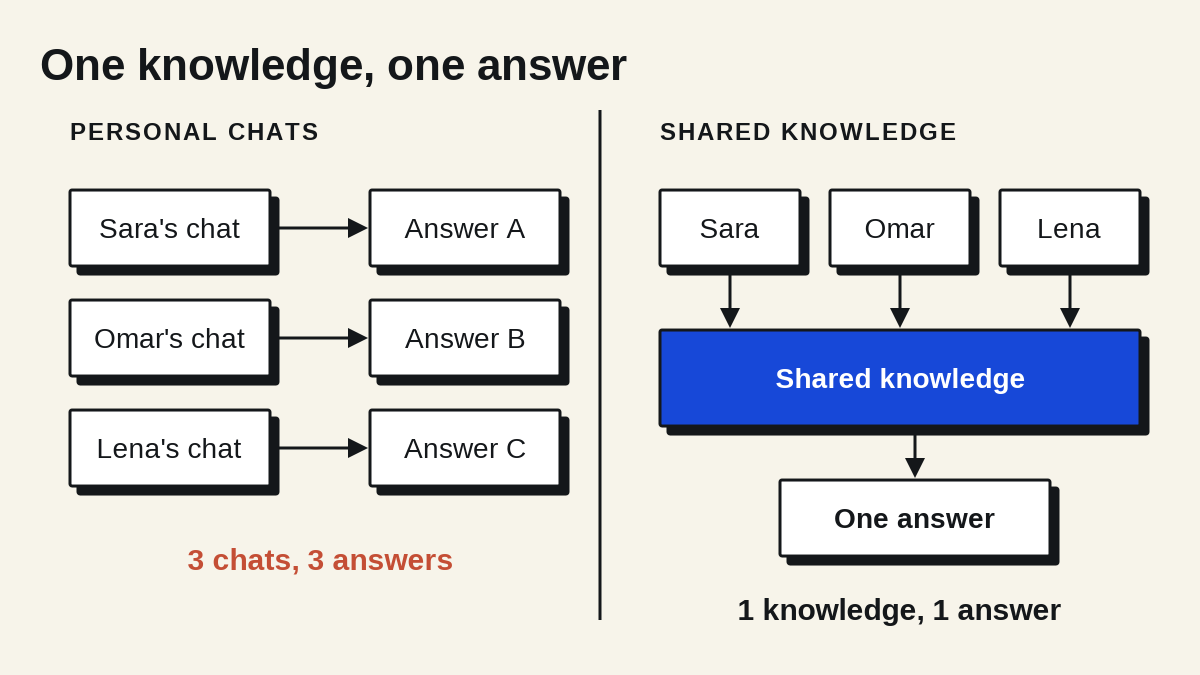
Say a customer asks three of your staff the same question about delivery to a remote area. Sara tells them 3 days. Omar tells them 5 days. Lena says "we do not go there". All three used an AI chat. All three gave the AI different context. The customer now has three answers and trusts none.
With shared knowledge, the delivery rule is written once. All three staff get the same sentence. If the rule changes, you change it once.
This post is about how to build the shared knowledge. For the full comparison of one assistant for each person against one assistant for the team, read AI assistant for business: one for each person, or one for the team?.
What knowledge to put in first
You do not need to write a manual. Start with 5 kinds of knowledge. Each one takes about 10 minutes to write down.
| Knowledge type | Example | Who owns it | How often it changes |
|---|---|---|---|
| What you sell | Product list, services, who each one is for | Owner or product lead | Every few months |
| What it costs | Prices, discounts, rules for exceptions | Sales lead | Often: every month or each quote season |
| Your policies | Refunds, delivery times, warranty, opening hours | Operations lead | Rarely, but a change matters at once |
| Your customers | Who buys, what they ask, what annoys them | Account or support lead | Each week, as you learn |
| Who does what | Who owns billing, support, stock, installs | Owner or office manager | When people join or move |
Read the table by the last column. The facts that change often need the closest owner. Prices go wrong first. Policies go wrong most expensively.
Notice what is not on the list. You do not need meeting notes, old project files or every email. Those are noise at the start. They make the AI slower to trust and harder to check.
A good rule: add a fact when a question shows a gap. Do not try to write everything on day 1. Each question the AI cannot answer tells you what to add next.
Write facts as plain sentences
Write each fact the way you would say it to a new colleague. "Refunds are paid within 7 days if the item is unused." That is better than a paragraph of legal text.
Put the rule and the exception together. "Delivery is free over 200 dollars, except to islands." One line, both parts.
Say who decides. "Discounts above 10 percent need the owner to approve." The AI can then tell a staff member who to ask.
Step by step: set it up in a team
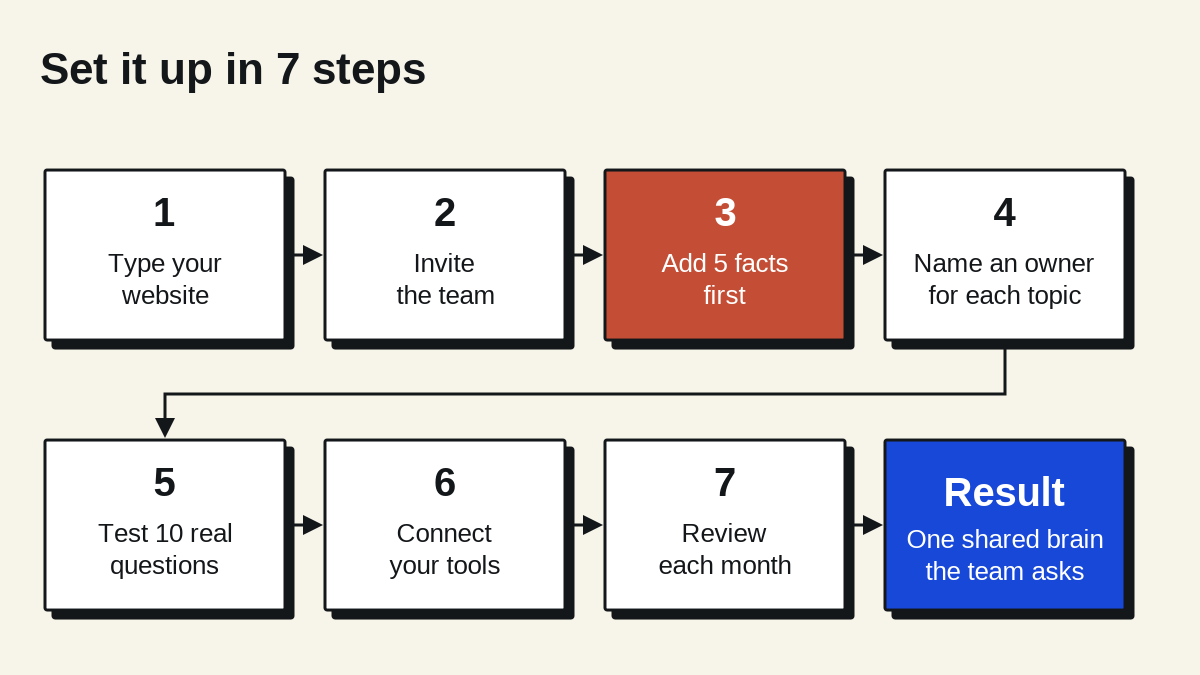
Here is the full set-up in 7 steps. Allow one afternoon for the 3 to 10 people who own the knowledge.
- Type your website. Open the Memox app on iPhone, Android or the web. Type your website address. The app reads it and learns what your business does. This takes about 1 minute.
- Invite your team. Add each person. Choose a role for each: owner, admin or member. Everyone then asks the same assistant.
- Add the 5 kinds of knowledge. Use the table above. Type what you sell, what it costs, your policies, your customers and who does what. Start with what your team asks most.
- Name an owner for each topic. Write the owner next to each kind of knowledge. One person, not a group.
- Test with 10 real questions. Take 10 questions your team asked last week. Ask the assistant. Count the right answers.
One brain for your company.
It answers your customers, your phone and your team. Book a call: we answer your questions live, on your own website.
- Connect your tools. Memox connects to Outlook mail, Outlook Calendar, OneDrive, Gmail, other email (IMAP and SMTP), Shopify, GitHub, Jira, HubSpot, Slack and Google Chat. The Memox team sets each connection up hands-on with you.
- Set a monthly review. Pick a day. The owners check their topics and fix old facts.
Why this order works
Step 1 gives you a working base in minutes, so nobody starts from a blank page. Steps 3 and 4 add what the website does not say: your real discount rules, your real exceptions.
Step 5 is the one most teams skip. Do not skip it. The test shows you where the gaps are, before a customer does.
Step 6 comes after the test, not before. First make sure the facts are right. Then connect the tools, so the assistant can also work with your mail, calendar, files and store. The Memox app answers from them, drafts replies, and runs routines and morning check-ins. You approve each email and each invite before it goes. It does not send on its own.
The 1-afternoon test
A simple pass mark helps. Ask 10 real questions. If 8 are right after the second round, the knowledge is good enough to roll out to the whole team. If fewer than 8 are right, add the missing facts and ask again.
Do the test with the people who ask the questions, not only the owner. They know which questions come up in real life.
Book a 30-minute call. We look at where your leads and customer questions come from today. We show Memox answering on your own website, live on the call. You leave with a plan: what we set up first and which of your tools we connect. Book the call
Three worked examples
These are invented companies. The numbers are examples, not customer results.
A 45-person installer
Say an installer of solar panels has 45 people: 8 in the office, 37 on the road. Before, the office answered the same calls all day. Each installer asked the office for the warranty terms, the roof types they cover and the next free slot.
The head of operations types the company website, then adds 5 kinds of knowledge. The warranty terms go in with the operations lead as owner. The price rules go in with the sales lead.
After the set-up, an installer on a roof asks the assistant in the Memox app: "What is the warranty on the inverter?" and gets the answer. The office stops answering the same 15 questions a day. Say that frees 2 hours of office time a day. The office uses it for quotes.
A 2-branch shop
Say a furniture shop has 2 branches and 60 staff. Before, each branch answered stock and delivery questions in its own way. A customer who asked both branches got two answers.
The head of operations puts the delivery zones, the return rule and the price rules in one place. The branch managers own the stock-handling rules for their own branch. The shop connects Shopify with the Memox team, so the assistant can also answer from the store.
After the set-up, both branches give the same answer on delivery and returns. New staff in the second branch stop asking the first branch. The head of operations reviews the price rules once a month, before each sale starts.
A design agency
Say a design agency has 40 people. Before, every project lead kept their own client notes in a personal chat. When one lead went on leave, the client had to explain everything again.
The agency puts the client list, the service rules and the "who does what" table into the shared place. Each project lead owns the notes for their own clients. The agency connects Slack and Gmail with the Memox team.
After the set-up, a second lead can cover for the first and ask "What did we promise this client for the launch?" The answer comes from the shared notes. Nothing leaves with a person on leave.
What the three share: the knowledge was written once, each topic had one owner, and the team asked questions in plain words.
Keeping knowledge correct
Shared knowledge helps only if it is right. A wrong fact in a shared place spreads to everyone. Three habits keep it right.
An owner for each topic
Every kind of knowledge has one named owner. The owner is the person who would know first if the fact changed. Prices belong to the sales lead. Policies belong to the operations lead.
The owner does not write everything. The owner is the one who is asked, and who fixes it.
A monthly review
Once a month, each owner reads their topic. They ask 3 questions. Is anything old? Is anything missing? Did the team ask something that the AI could not answer?
It takes 15 minutes for each owner. Put it in the calendar. Do it on the same day each month, so it becomes a habit and not a project.
Also review at once when something big changes: a new price list, a new supplier, a new refund rule. Do not wait for the monthly date.
What to do with a wrong answer
A wrong answer is useful. It tells you where the knowledge is weak. Follow four steps.
- Find the cause. Is the fact missing, old or unclear?
- Tell the owner. The person who saw the wrong answer tells the topic owner.
- Fix the fact. The owner writes the right fact as a plain sentence.
- Ask again. Ask the same question and check the answer.
Do not blame the person who found the error. You want people to report errors. If reporting feels risky, errors stay hidden.
Privacy and roles
Many teams worry that a shared assistant means a shared inbox. It does not.
In Memox, there are 3 roles: owner, admin and member. Each person keeps a private chat. Raw emails and file text stay private to the person who connected them.
Here is what that means in daily work. Sara connects her Gmail. The assistant uses her mail to help Sara. Omar cannot read Sara's raw emails. If her mail shows a new delivery rule, the topic owner writes that rule into the shared knowledge as one plain sentence.
You can hand a task to a teammate. The teammate gets a push message, and a board shows who has what. The assistant drafts replies for you, and you approve each email and each invite before it goes.
Give the owner role to as few people as possible. Give the admin role only to the people who need it. Everyone else is a member.
The same knowledge can serve your customers
Once your business knowledge is in one place, more than your team can use it. This is the idea behind Memox: one brain for your company. It answers your customers, your phone and your team.
The same knowledge runs these parts:
- The website chatbot answers visitors day and night from your knowledge, and captures the visitor's name and contact.
- The voice agent picks up the business line in seconds and answers from the same knowledge.
- The CRM turns every chat and every call into a contact with a stage and a timeline. Nobody types it in.
- Handoff passes the visitor to a person when the AI sees that a person is needed. It picks a rep, and the visitor sees "A rep has been asked".
- The Memox app gives each team member an assistant for the work itself.
Think about what this means for your knowledge work. You fix the delivery rule once. The team, the chatbot and the voice agent all give the new answer. You do not edit three systems.
ContainerOne, an online container dealer, uses the Memox website chatbot. In 30 weeks to 27 Apr 2026, it had 797 chats and 734 leads. The AI alone handled 90.6% of the chats. There were 75 handoffs, each with a rep assigned. The chatbot can do this because it answers from the dealer's own knowledge. Read the ContainerOne case study for the detail.
See the full set on the Memox platform page. See which tools connect on the Universe page. If you want to hear the voice agent, call +1 (573) 490-0128, or call in the browser on the demo page.
Common mistakes
These are the mistakes that make a knowledge set-up fail. Each has a simple fix.
- Putting in everything on day 1. Old files, meeting notes and every email bury the useful facts. Fix: start with the 5 kinds of knowledge. Add a fact each time a question shows a gap.
- No owner for a topic. If everyone owns it, nobody fixes it. Fix: one named person for each topic, written down.
- Skipping the test. The first sign of a gap should not come from a customer. Fix: ask 10 real questions before you roll out. Use the questions your team asked last week.
- Writing long legal text. The AI and the team both do better with plain sentences. Fix: write each rule as you would say it to a new colleague. Put the exception in the same sentence.
- Never reviewing. Prices move. Policies change. Fix: a monthly review on a fixed day, 15 minutes for each owner.
- Treating a wrong answer as a failure of the AI. Most wrong answers are old or missing facts. Fix: use the 4 steps above. Find the cause, tell the owner, fix the fact, ask again.
- Making it a tool project. A team that thinks "we need to learn a new tool" will drag its feet. Fix: say "ask the assistant like you would ask a colleague". Nobody needs a course. If you are worried about time, read Too busy to learn AI.
Next step
Type your website into the Memox app and see what it knows. Then write down the 10 questions your team asked last week. To compare tools first, read Internal knowledge base software: 7 questions before you choose. To see how Memox reads a website, read URL to AI agent in two minutes.
Book a 30-minute call
- We look at where your leads and customer questions come from today.
- We show Memox answering on your own website, live on the call.
- You leave with a plan: what we set up first and which of your tools we connect.
If it fits, our team does the setup with you. We connect your tools, train the brain on your business and hand you a working system. You do not learn AI.
Each setup is hands-on, so we price it to your business. You get a clear quote after the call.
One brain for your company.
It answers your customers, your phone and your team. Book a call: we answer your questions live, on your own website.
Frequently Asked Questions
It is the practice of keeping your business knowledge in one shared place and using AI to answer questions from it. The team asks in plain words. The AI answers from the same facts for everyone.
It is the shared place that holds your facts: products, prices, policies and the answers your team gives. The AI reads it and answers from it. People do not search folders.
A wiki or folder holds documents, and a person must search and read them. With AI knowledge management, a person asks a question and gets an answer drawn from those documents.
You type your website and the Memox app reads it and learns what your business does in about 1 minute. Then you invite your team and add more facts at any time.
No. Memox has 3 roles: owner, admin and member. Each person keeps a private chat. Raw emails and file text stay private to the person who connected them.
Your data is hosted in Germany (EU). A data processing agreement (DPA / AVV) is available.
Start with 5 things: what you sell, what it costs, your policies, your customers and who does what. Add a new fact each time a question shows a gap.