Human Handoff From AI Chat: The Customer Can Always Ask for a Person

Key Takeaways
- A customer can always ask for a person. The AI asks the right rep, and the chat shows: A rep has been asked.
- The AI tries the customer's own rep first, then a free rep on the same team, then the next free rep in turn.
- The visitor sees 'A rep has been asked'. Memox never says a rep has joined before that is true.
- You decide when the AI hands off, through your knowledge and your policies. You also choose who receives handoffs.
- The AI does the first part. Your team does the rest.
A customer types "I want a person" and the bot answers with the same menu again. That is the fear behind every AI chatbot human handoff. A human handoff is the moment an AI chat passes a visitor to a person on your team. In a good one, the customer can always ask for a person. The AI picks the right rep, tells the visitor the truth, and alerts the rep with the contact details.
This post is for support and sales leads who fear a bot that traps the customer. It explains the 4 rules of a Memox handoff, what each side sees, and how a team runs it.
The fear: a bot that traps the customer
Everyone has met the loop. You ask for a person. The bot offers a menu. You ask again. The bot says it did not understand. You give up.
Three failures cause most of the damage:
- The loop. The bot never lets the customer leave. Every message returns to the same menu.
- The false promise. The screen says "An agent has joined" while nobody has. The customer waits for a person who is not there.
- The lost story. A person does arrive, but knows nothing. The customer repeats the whole problem.
Each failure has the same root. The system treats the handoff as a failure of the bot. It should treat the handoff as a normal, planned part of the service.

A fair doubt follows: will my staff feel replaced? The answer is no, if you set the handoff up well. The AI does the first part of the work. Your team does the part that needs a person.
The 4 rules of a Memox handoff
Memox is one brain for your company. The website chatbot, the voice agent, the CRM and the Memox app all run on it. The handoff is the point where that brain passes the customer to your people.
Four rules govern it. Each rule has a reason.
Rule 1: the customer's own rep comes first
The AI picks the rep in a fixed order:
- The customer's own rep, found in the CRM.
- A free rep on the same team.
- The next free rep in turn.
It checks who is online on the web and who has the phone app. Then it asks that person.
Why: a customer who already has a rep does not want a stranger. The same rep knows the history. Nobody repeats the story.
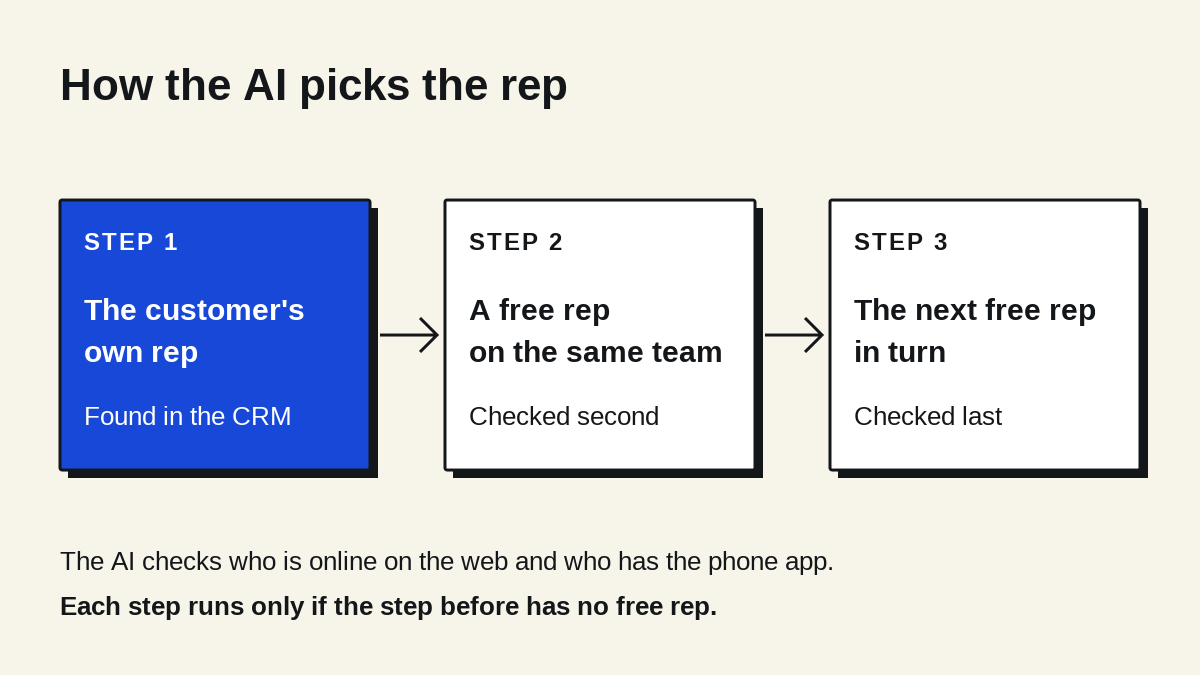
The order protects two things. First, the relationship stays with one person when that person is free. Second, nobody waits just because the favorite rep is busy. The next step takes over.
Rule 2: the visitor sees the truth
The visitor sees "A rep has been asked". The chat never says a rep has joined before that is true.
Why: a false promise is worse than a short wait. If the screen says a person is here and nobody is, the customer feels lied to. "A rep has been asked" is honest. It says a request exists, and nothing more.
Rule 3: the rep is told at once
A handoff that nobody sees is a trap with extra steps. So the rep gets a phone push, a browser push and an email. The email carries the visitor's name and contact details.
Why: reps are not always at the desk. Three channels cover the desk, the pocket and the inbox. The rep's first reply takes over the chat.
Rule 4: your company chooses who receives handoffs
An owner or admin turns "receive handoffs" on or off for each member.
Why: teams differ. A new hire may need a week before taking chats. A manager may want to see all of them. A part-time rep may only want a few. You decide, person by person.
What each side sees
Two people watch the same moment from two screens. They need different things.
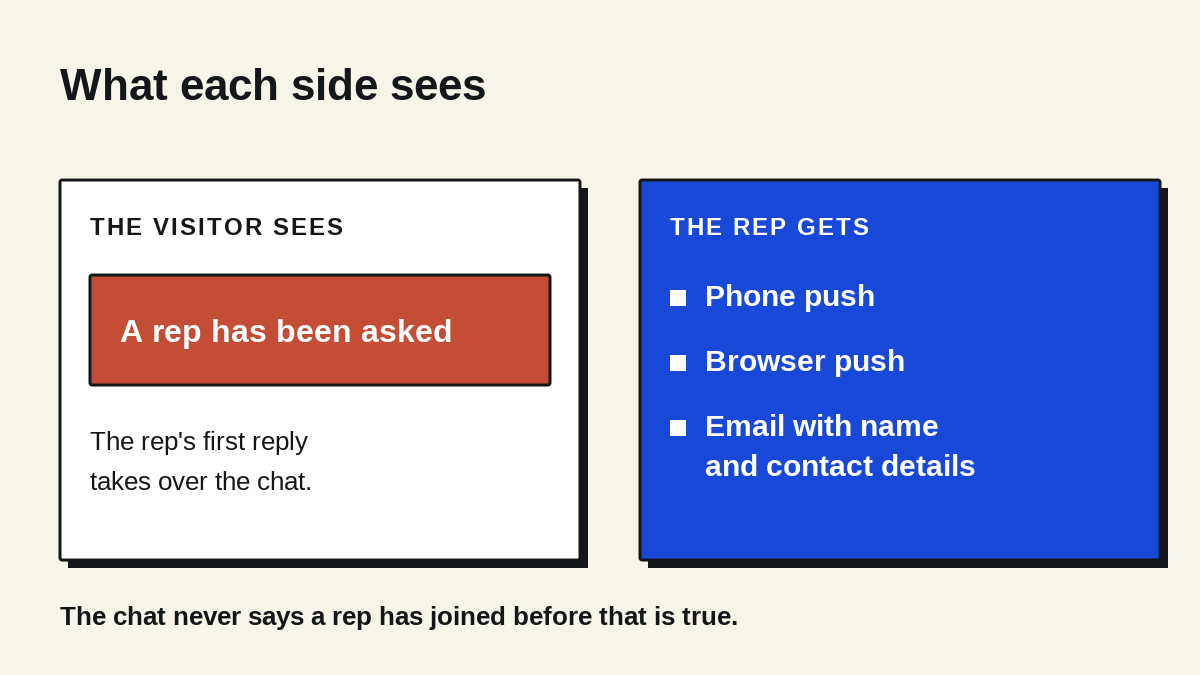
The visitor needs calm and honesty. The status line says that a request exists. It does not promise a person who is not there.
The rep needs speed and context. The push says that a chat needs a person. The email carries the name and contact details. If the chat dies, the rep can still reach the visitor.
The CRM adds the third view. Every chat becomes a contact with a stage and a timeline. Nobody types it in. The rep who takes the chat sees what came before. For the full picture of how this works, read a CRM that fills itself.
| Moment | The visitor sees | The rep gets |
|---|---|---|
| The handoff starts | A rep has been asked | A phone push and a browser push |
| The rep is away from the desk | The same true status | An email with name and contact details |
| The rep replies first | The rep takes over the chat | The chat and the CRM contact |
If the rep is away
Sometimes the customer's own rep is not there. Your company has two choices.
Do not hold. If the own rep is not free, the AI moves to the next step: a free rep on the same team.
Hold for the own rep. Your company can turn on a setting that holds the chat for the customer's own rep. The AI keeps answering until that rep takes over.
Hold fits teams where one person owns each customer. A key-account manager is the example. The customer expects that person, not a stranger.
Do not hold fits teams where speed beats ownership. A shop that sells off the shelf wants any free rep, fast.
The hold has a cost. If the own rep stays away for days, the chat waits. Set a rule for long absences. A rep on leave should turn off "receive handoffs" for that period, or a teammate should cover.
For why the own rep matters so much, read assigned-rep handoffs need more than routing.
You choose who receives handoffs
Handoff is a team feature, not only a bot feature. Your people decide how it runs.
An owner or admin controls "receive handoffs" for each member. Use it with care:
- Switch it off for a person on leave.
- Switch it off for a new hire in the first days.
- Switch it on for the manager who wants to watch.
- Switch it off for someone who only does back office work.
The setting is per member. It is not a company switch. So you can build a team that fits your real week.
When should the AI hand off?
The trigger is a rule you set. The AI works from your knowledge and your policies. You write down when a person must step in. The AI follows what you wrote.
One brain for your company.
It answers your customers, your phone and your team. Book a call: we answer your questions live, on your own website.
Here are five common triggers. Treat the table as a policy you write, not as a list of fixed features.
| Trigger | What you put in your knowledge or policy | What the AI does |
|---|---|---|
| The visitor asks for a person | "Always hand off when asked." | Starts the handoff at once |
| The knowledge does not cover the question | "Never guess. Offer a person." | Says it does not know, and offers a person |
| A complaint | "A complaint always goes to a person." | Hands off and keeps the tone calm |
| A price exception | "Discounts outside the price rules need a rep." | Hands off, and does not promise a price |
| A high-value request | "A large order goes to a rep." | Hands off with the contact details |
The first trigger is the promise: the customer can always ask for a person. The other four are your policy.
Write these rules as plain sentences. Put them where the AI reads them, in the same place as your price rules and your policies. Short rules work best.
When the knowledge does not cover a question, the AI can say so and offer a person. That sentence is worth more than a smart guess. A wrong answer about a price or a warranty costs more than a short wait for a rep.
During the chat: take over and whisper
A rep has two tools once a chat is open.
Take over. Your team can take over any live chat. The rep's first reply takes it over. From then on, the person talks and the AI steps back.
The private note. A rep can send a private note to the AI during a live chat. The visitor does not see it. Use it to steer the AI while the rep finishes another task.
Examples of a good private note:
- "Do not promise a delivery date."
- "Ask for the order number first."
- "Offer a call tomorrow morning."
The private note keeps the chat smooth. The visitor sees one voice, and the rep still guides it.
You also read the full chat log. That gives you the record of what the AI said and what the rep said. Use it in the weekly review below.
Book a 30-minute call. We look at where your leads and customer questions come from today. We show Memox answering on your own website, live on the call. You leave with a plan: what we set up first and which of your tools we connect. Book the call
Set up handoff in a team, step by step
The steps below fit a sales or support team of 5 to 50 people. Plan on about an hour.
- Decide who receives handoffs. List your reps. Switch "receive handoffs" on for each one who will take chats. An owner or admin does this.
- Decide the hours. Write down when your team answers. Put the hours in your knowledge. Then the AI can tell a visitor at night when the team is back.
- Choose hold or no hold. If one person owns each customer, turn on hold for the own rep. If speed matters more, leave it off.
- Set up alerts on phones. Each rep installs the phone app and allows push alerts. Check the browser push on each desk too.
- Write a reply standard. Agree how fast a rep answers after a push. Write the number on the wall. Keep it short.
- Write your triggers. Add the five triggers from the table to your knowledge and policies.
- Test with 3 chats. Run one chat as a known customer, one as a new visitor and one with a complaint. Watch the status line and the push on each phone.
- Review every week. Read the chat log. Look at each handoff. Ask: did the right rep get it, and did the rep take over fast?
Do the test before you tell customers. A bad first handoff is hard to forgive.
For the chatbot itself, see the setup guide for a website chatbot with human handoff. This post does not repeat it.
Three worked examples
These are invented cases. They show how the rules work together.
Case 1: a known customer with an own rep
Say a 120-person HVAC firm has a customer called Mr Hale. His own rep is Dana. Mr Hale opens the chat and writes: "My service visit is wrong. Let me talk to someone."
- The AI sees a request for a person and starts the handoff.
- It looks in the CRM. Dana is Mr Hale's own rep.
- Dana is online on the phone app, so the AI asks Dana.
- Mr Hale sees "A rep has been asked".
- Dana gets a phone push, a browser push and an email with his name and contact details.
- Dana replies. Her first reply takes over the chat.
Mr Hale never repeats his story. The CRM timeline already holds his last visit.
Case 2: a new visitor at night
Say a furniture retailer with 2 branches has a chat at 11 pm. A new visitor asks for a sofa in a color the shop does not list. The knowledge does not cover it.
- The AI says it does not know and offers a person.
- The visitor accepts. The AI captures the name and contact details.
- No own rep exists, because this is a new contact. The AI asks a free rep on the same team, or else the next free rep in turn.
- The visitor sees "A rep has been asked". The knowledge holds the opening hours, so the AI says when the team is back.
- The rep gets the push and an email. The next morning, the rep sees the name and contact details and writes first.
The visitor was not left in silence. The shop kept the lead, and nobody typed it in.
Case 3: a rep on leave
Say a 20-person accounting firm has a client with an own rep called Omar. Omar is on leave for two weeks. The firm turned on the hold setting.
- The client asks for a person.
- The AI looks in the CRM and finds Omar.
- Hold is on, so the chat waits for Omar. The AI keeps answering.
- The client waits too long for a hard question.
This case shows the cost of hold. The fix is simple. The firm should have turned off "receive handoffs" for Omar before his leave, or turned hold off for that period. Then a free rep on the same team would have taken the chat.
A handoff policy you can copy
Paste this table into your team notes and change the numbers.
| Item | Your rule |
|---|---|
| Who receives handoffs | Every rep who takes chats |
| Hours | Write the days and the times |
| Own rep first | Yes, from the CRM |
| Hold for own rep | On for key accounts, off for the rest |
| Alert channels | Phone push, browser push, email |
| Reply standard | Write one number in minutes |
| Triggers | Visitor asks, no answer in the knowledge, complaint, price exception, high-value request |
| Private note | Use it when a rep is busy |
| Weekly review | Read every handoff in the chat log |
| Leave rule | Turn off "receive handoffs" before leave |
A real case: ContainerOne
ContainerOne is an online container dealer. It uses the Memox website chatbot. ContainerOne approved these numbers.
In the 30 weeks to 27 Apr 2026, it had 75 handoffs, each with a rep assigned. In every handoff, the system picked a person. The chatbot side of these numbers is in a website chatbot with human handoff, and the full story is in the ContainerOne case study.
What to tell your staff
The handoff changes the day of your reps. Tell them early, in plain words.
- The AI answers the first questions. It does not take their jobs.
- They get chats that already have a name and contact details.
- They can send a private note to the AI to steer it.
- Their manager decides who receives chats. Nobody is forced.
- A person always has the last word.
A 10-minute talk before the start is worth more than a long manual. Say it this way: the AI does the first part, and your team does the rest.
Then agree the reply standard. The handoff works only as well as the reply that follows the push.
Where this fits in Memox
The same handoff runs across Memox, because Memox is one brain for your company. It answers your customers, your phone and your team.
- The website chatbot starts the handoff in a chat.
- On the phone, the voice agent puts a caller who needs a person on a follow-up list with a status. Read the voice agent post for the call side.
- The CRM knows who owns the customer, and it records every chat and call.
- The Memox app lets a teammate hand a task to another teammate. The teammate gets a push, and a board shows who has what.
- The handoff page describes the product in short.
See the whole set on the platform page, or read how the pieces connect in the Memox universe. If you want the idea behind it, start with what is a company brain.
Common mistakes
- No reply standard. A push means nothing if nobody answers. Fix: write one number for the reply time, and check it each week.
- Hold on for everyone. A chat can wait too long. Fix: use hold only for key accounts, and set a leave rule.
- Reps with notifications off. The push arrives and nobody sees it. Fix: test the phone app and the browser push on each device.
- Vague triggers. The AI cannot follow a rule you did not write. Fix: write the five triggers as plain sentences in your knowledge and policies.
- Skipping the test. The first real customer finds the fault. Fix: run 3 test chats before you tell anyone.
- Never reading the log. You miss patterns. Fix: read every handoff once a week and ask what the AI should have known.
- Telling staff late. Fear grows in silence. Fix: talk to the team before the start.
Your next step
Copy the policy table above and fill in each row with your team. The handoff page shows how the product works.
Book a 30-minute call
- We look at where your leads and customer questions come from today.
- We show Memox answering on your own website, live on the call.
- You leave with a plan: what we set up first and which of your tools we connect.
If it fits, our team does the setup with you. We connect your tools, train the brain on your business and hand you a working system. You do not learn AI.
Each setup is hands-on, so we price it to your business. You get a clear quote after the call.
One brain for your company.
It answers your customers, your phone and your team. Book a call: we answer your questions live, on your own website.
Frequently Asked Questions
Yes. A customer can always ask for a person. The AI starts the handoff and asks a rep. The chat shows: A rep has been asked.
The customer's own rep from the CRM. If that rep is not available, a free rep on the same team. If nobody on the team is free, the next free rep in turn.
If your company turns on the hold setting, the chat waits for the customer's own rep and the AI keeps answering. The rep's first reply takes the chat over.
It is the moment an AI chat passes a visitor to a person on your team. The AI asks a rep, shares the visitor's name and contact details, and the rep takes over the chat.
Yes. An owner or admin turns 'receive handoffs' on or off for each team member.
Yes. A rep can send a private note to the AI during a live chat. The visitor does not see the note.
Your data is hosted in Germany (EU). A data processing agreement (DPA / AVV) is available.
Yes. ContainerOne, an online container dealer, uses the Memox website chatbot. In 30 weeks to 27 Apr 2026, it had 75 handoffs, each with a rep assigned. ContainerOne approved these numbers.