The Memox App: Your Own AI Assistant, Connected to the Company Brain

Key Takeaways
- An AI agent works with your mail, calendar, files and store. A chat that only talks does not.
- Type your website in the Memox app. In about 1 minute it knows what your business does.
- You approve each email and each invite before it goes. The app does not send on its own.
- You can hand a task to a teammate. That person gets a push, and a board shows who has what.
Your inbox is full, a quote waits for a reply, and you cannot find last week's file. AI agents for business do this work in the tools you already use. The Memox app is one: your own AI assistant, connected to the company brain. It reads your mail, calendar, files and store. It drafts replies. You approve each one before it goes.
You do not need to learn AI to use it. You type your website, and in about 1 minute the app knows what your business does. This post explains what an AI agent is, what the app does in a work day, what it costs, what it does not do, and how to choose one.
What an AI agent is, in plain words
A chat assistant talks. You ask a question, and it gives an answer from what it knows. You then copy the answer into your mail yourself.
An AI agent works. It connects to your mail, your calendar, your files and your store. It reads them, finds the fact, and does the first part of the job. It drafts the reply. It prepares the invite.
The key difference is the link to your tools. A chat that does not see your inbox cannot tell you what your supplier wrote. An agent that sees your inbox can.
A second difference is control. A good agent asks before it acts. The Memox app drafts, and you approve each email and each invite before it goes. It does not send on its own.
So ask two questions about any assistant. Does it see my real work? Does it ask before it acts? If both answers are yes, you have an agent. If not, you have a chat.
Where the Memox app fits
The Memox app runs on iPhone, Android and the web. It is your own AI assistant for the work itself. It is also one of 5 Memox products on one brain, which a later section explains.

Type your website: in about 1 minute it knows what you do
Get the Memox app on iPhone or Android, or open it on the web. Type your website address.
The app reads your site and learns what your business does. This takes about 1 minute.
Most AI tools start with a blank box. A blank box asks you to explain your business first. That costs time, and you may not have it. The Memox app starts from the page you already wrote for your customers.
For the same idea in more detail, read how a URL becomes an AI agent in two minutes.
What to check after the first read
The app learns from your site, so it is as good as your site. Check three things in the first 10 minutes.
- What you sell. Ask "what do we sell?" Compare the answer with your own list.
- Who you serve. Ask "who are our customers?" If it is too wide or too narrow, tell the app.
- How you talk. Ask for a short reply to a customer. Read it. Does it sound like you?
If an answer is wrong, say so in plain words. Add the missing fact. You add facts a few at a time as questions come up. You do not need to finish a set-up before you start.
What it does in a work day
The Memox app is an assistant for the work itself. It answers from your mail, your calendar, your files and your store. Here is a day with it, in order.
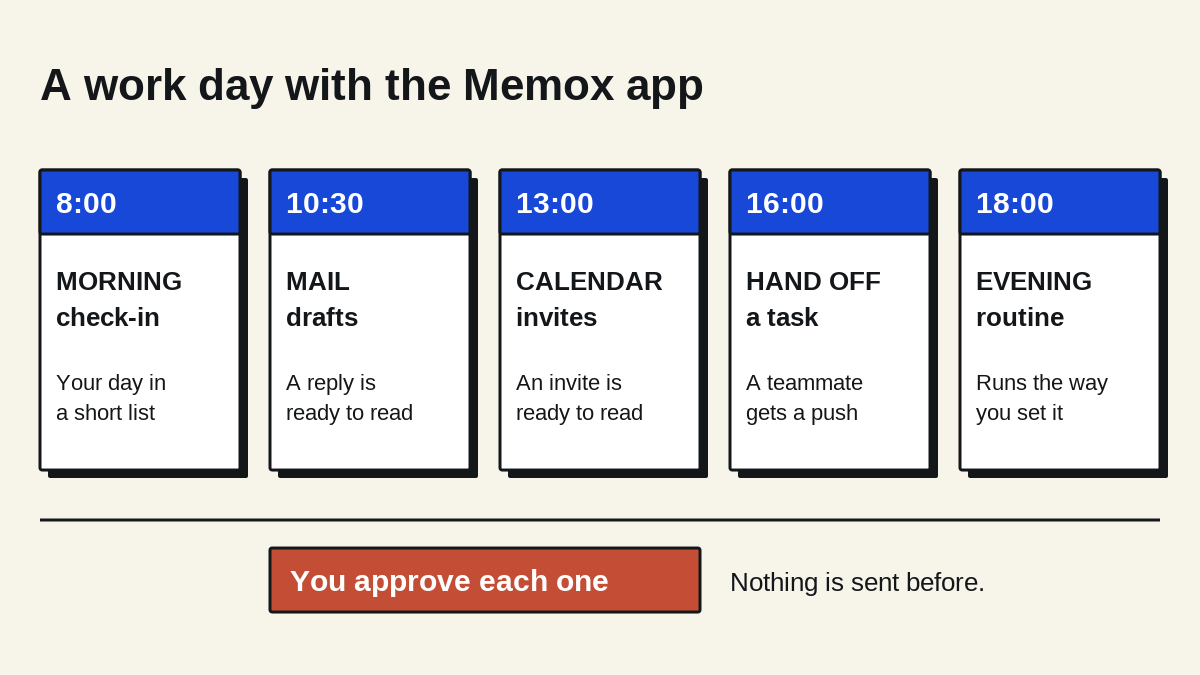
In the morning, a check-in tells you what needs you today. It reads your mail and your calendar and gives you a short list. You set the check-in once, and it follows your setting.
Mid-morning, a customer writes. You say "reply to the supplier about the late shipment". The app drafts the reply. You read it, change a word, and approve it.
After lunch, you want a call with a client. You say "set up a call with Maria next week". The app drafts the invite. You approve it, and it goes.
Late in the day, you give a task to a teammate. At the end of the day, a routine you set runs. You use plain words in every step. You ask the way you would ask a colleague.
The jobs it does, and how you ask
The table below lists the main jobs. Each row shows what you say and what you get. The words are examples. You can say it your own way.
| Job | What you say | What you get |
|---|---|---|
| Answer from mail | "What did the supplier say about the shipment?" | An answer from your inbox |
| Answer from the calendar | "What is on Thursday?" | Your Thursday, from your calendar |
| Answer from files | "Where is the signed quote for the Hall job?" | The answer from your connected files |
| Answer from the store | "How is stock on the blue model?" | The stock answer from your store |
| Draft a reply | "Reply to Maria and say Friday works" | A draft that you read and approve |
| Draft an invite | "Set up a call with Maria next week" | An invite that you approve before it goes |
| Run a routine | "Every evening, check what is still open" | A routine that runs the way you set it |
| Morning check-in | "Start my day" | A short list of what needs you |
| Hand a task to a teammate | "Kevin needs to find a badge printer" | A task for Kevin, and a push to his phone |
Notice the pattern. The first four rows are questions. The next two are drafts. The last three are routines and hand-offs. In every row you stay in charge.
Answers come from your own work
The app answers from what you connect: your mail, your calendar, your files and your store. If a fact is in none of them, connect the source or tell the app. A later section returns to this limit.
You approve each email and each invite before it goes
An AI that sends mail on its own is a risk. A wrong sentence to a customer costs trust. A wrong invite wastes another person's day.
The Memox app does not send on its own. It drafts the email or the invite. You see it. You approve each one before it goes.
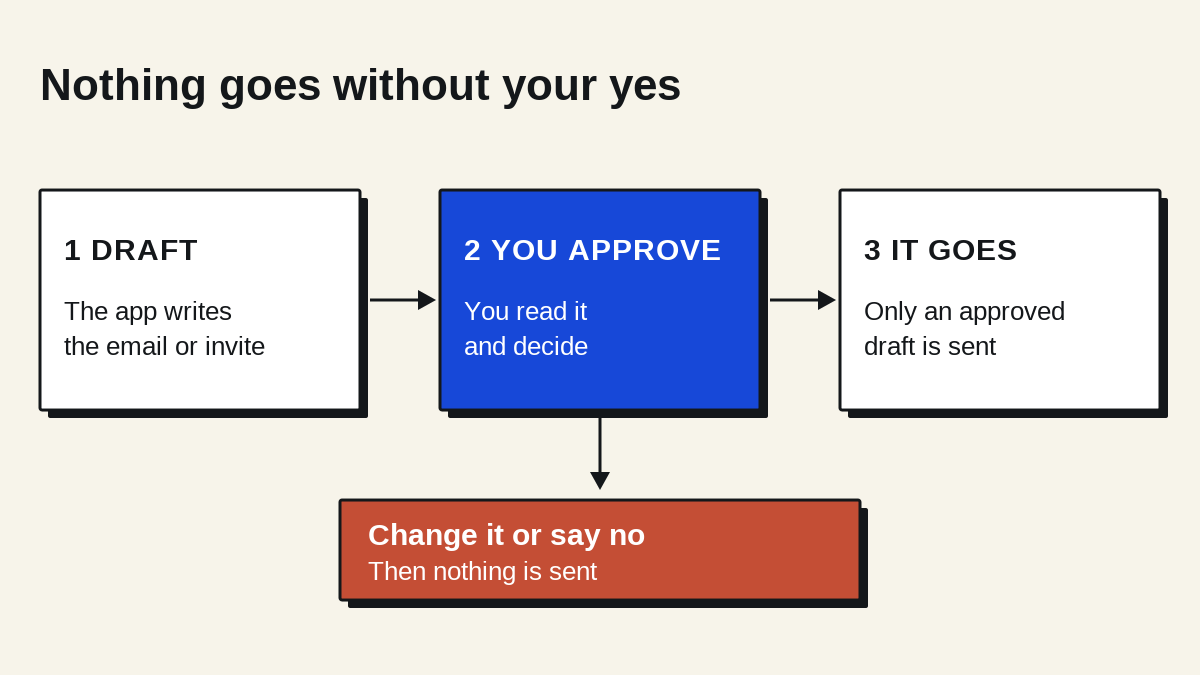
You have three choices on every draft. You approve it, you change it, or you say no. Only an approved draft goes out.
This splits the work in a sensible way. The AI does the slow part: the first draft. You do the part that needs your name on it: the decision.
It also makes the app easy to trust. You do not have to believe that the AI is always right. You only have to read a short draft. You will find that routine drafts need one small change, or none.
Hand a task to a teammate
You work with other people, and the Memox app knows that.
Say "Kevin needs to find a badge printer". It becomes a task for Kevin. His phone gets a push. He sees what you asked.
One brain for your company.
It answers your customers, your phone and your team. Book a call: we answer your questions live, on your own website.
A board shows who has what. You do not need to chase a status by message. You open the board and see each task and its owner.
So the Memox app is not only a chat for one person. Your team shares tasks and company facts in one workspace. For the question of one chat for each person versus one workspace for the team, read AI for the whole team, or one chat for each person?
Why the push matters
A task that nobody sees is not a task. The push puts the work in front of the person it belongs to. The board then shows you that it was handed over. This is the same idea that the handoff to your team uses for customers: a person is named, and that person is told.
Privacy and roles
A work assistant sees mail and files. You should know who sees what.
The Memox app has 3 roles: owner, admin and member.
Each person keeps a private chat with the app.
Raw emails and file text stay private to the person who connected them. If you connect your mailbox, your teammates do not read your emails. They work with the shared tasks and the shared facts.
So the split is clear. What you ask in private stays private. What you hand to a teammate is shared, because a task must be seen to be done.
Book a 30-minute call. We look at where your leads and customer questions come from today. We show Memox answering on your own website, live on the call. You leave with a plan: what we set up first and which of your tools we connect. Book the call
The 11 apps that connect
The app is only as useful as the tools it can see. 11 apps connect:
- Outlook mail and Outlook Calendar
- OneDrive
- Gmail and other email (IMAP and SMTP)
- Shopify
- GitHub and Jira
- HubSpot
- Slack and Google Chat
The Memox team sets each connection up hands-on with you. You do not need to find an option in a settings page or fix a key by yourself.
Start with the two that hold most of your day: your mail and your calendar. Add the store, the files or the team chat when you want answers from them.
For the HubSpot link and how the CRM fills itself, read a CRM that fills itself.
What it costs
Memox app, for one person: the first 20 tasks are free. After that, plans start from 20 dollars a month.
The free tasks are enough to test the app on real work. Use them on the jobs from the table above: one morning check-in, a few replies, one invite and one hand-off. If the drafts save you time, you will know within the free tasks.
What it does not do
It helps to know the edges. These are limits by design.
- It does not send on its own. You approve each email and each invite.
- It does not decide for you. It drafts and answers. You choose.
- It does not know a fact that it has never seen. A new fact must come from your mail, files or store, or you tell the app.
The third limit is a reason to connect the right sources. An answer about stock is only as good as the store it reads. Connect the store, and the answer comes from the store.
The app is also an assistant for the work, not a front office. If you want to answer website visitors at night or pick up a phone line, use the website chatbot or the voice agent. The app is the door for you and your team. The other products are the doors for your customers.
Step by step: your first week
Keep the first week small. One job a day is enough.
- Day 1. Get the Memox app. Type your website. Check what you sell, who you serve and how you talk. Ask for your day.
- Day 2. The Memox team connects your mail and calendar with you. Ask for a reply to one real email. Read the draft. Change one word. Approve it.
- Day 3. Set a morning check-in. Read it before you open your inbox.
- Day 4. Hand one task to a teammate. Check that the person got the push and that the board shows the task.
- Day 5. Add one more connection, such as your store or your files. Ask one question that needs it.
- Day 6. Write a note: which task took less time, and which draft you would not send.
- Day 7. Read the note. Keep the jobs that saved time. Drop the ones that did not.
The note on day 6 is the most useful step. It shows you where to trust the assistant and where to keep your own hand on the work.
Three examples
These people are invented. The numbers are examples, not results.
A head of e-commerce
Say a head of e-commerce runs a store with 300 products and a team of 40. Customers ask about stock all day. The head of e-commerce often opens the store admin just to check a number.
With the app, the head of e-commerce asks "how is stock on the blue model?" The app checks the Shopify store and answers. The head of e-commerce then asks for a reply to a customer who wants a date. The app drafts it. The head of e-commerce approves it.
The gain is fewer tabs. The head of e-commerce stays in one chat, and every message to a customer still passes the head of e-commerce's eyes.
A site manager with a full inbox
Say a site manager at a building contractor has 60 unread emails after a week on site. Some are quotes, some are suppliers, some are clients with questions.
The manager connects the mailbox and starts the day with a check-in. The app gives a short list of what needs a reply. The manager says "reply to the supplier and say we take the later delivery". The app drafts it. The manager approves.
The app does not send on its own. Each reply and each invite waits for the manager's yes.
An agency lead handing out tasks
Say an agency lead has 40 people and 60 open jobs. Tasks sit in the lead's head and in a dozen messages.
The lead says "Priya needs to send the revised scope to the client". Priya gets a push. The board shows the task under her name. At the end of the day, the lead runs a routine that checks what is still open.
The gain is clarity. Everyone knows who has what, and the lead does not chase by message.
How to choose an AI agent for a business
Many tools use the word "agent". Use these 7 questions to compare them. Ask the same questions of the Memox app.
| Question | What a good answer looks like |
|---|---|
| Does it see my real work? | It connects to your mail, calendar, files and store |
| Does it ask before it acts? | You approve each email and each invite before it goes |
| How long to the first useful answer? | Minutes, not weeks. Type your website and go |
| Who sees my mail and files? | Only the person who connected them. Roles for the rest |
| Is data handling in writing? | A clear answer. Memox: A data processing agreement (DPA / AVV) is available. |
| Who sets up the connections? | A person who does it with you, hands-on |
| What does it cost to test? | A free start, and a plain price after |
Score each tool, yes or no. A tool that fails the first two questions is a chat, not an agent. Do not buy a tool that sends mail on its own, unless you accept the risk of a wrong sentence under your name.
The Memox app is 1 of 5 products on one brain
Memox is one brain for your company. It answers your customers, your phone and your team. The app runs on that brain with the website chatbot, the voice agent, the CRM and handoff, so a fact you fix once reaches all five. To see it drawn, open the universe or the platform page. For the idea behind it, read what a company brain is.
Common mistakes
- Starting with a blank box. You then explain your business from zero. Fix: type your website first.
- Skipping the check after the first read. The app is only as good as your site. Fix: ask what you sell, who you serve and how you talk.
- Approving without reading. The draft carries your name. Fix: read each draft. It is short.
- Connecting everything on day 1. You will not use it all. Fix: start with mail and calendar.
- Expecting it to know what it has not seen. It will say so. Fix: add the fact, or connect the source.
- Keeping tasks in your head. A task that is not handed over is not done. Fix: hand it to the teammate in the app.
- Judging it on one draft. One bad draft tells you little. Fix: use the first week, then read your note.
What it costs to start
Each setup is hands-on, so we price it to your business. You get a clear quote after the call. See the Memox app page and the platform.
Book a 30-minute call
- We look at where your leads and customer questions come from today.
- We show Memox answering on your own website, live on the call.
- You leave with a plan: what we set up first and which of your tools we connect.
If it fits, our team does the setup with you. We connect your tools, train the brain on your business and hand you a working system. You do not learn AI.
Each setup is hands-on, so we price it to your business. You get a clear quote after the call.
One brain for your company.
It answers your customers, your phone and your team. Book a call: we answer your questions live, on your own website.
Frequently Asked Questions
An AI agent does work in your tools, such as reading mail, checking a calendar and drafting replies. A chat only gives answers. The Memox app is an AI agent that asks you before it acts.
The best one fits the work you do each day, connects to your tools and asks before it sends. Use the 7 questions in this post to compare any agent, the Memox app included.
It is an assistant for one person that answers from your mail, calendar, files and store, and drafts replies. The Memox app is one. You approve each email and each invite before it goes.
No. The Memox app drafts the email or the invite. You approve each one before it goes. You can change it or say no.
Get the Memox app on iPhone or Android, or use it on the web. Type your website address. The app reads your site and learns what your business does in about 1 minute.
Each setup is hands-on, so we price it to your business. You get a clear quote after the call.
Your data is hosted in Germany (EU). Each person keeps a private chat. Raw emails and file text stay private to the person who connected them. A data processing agreement (DPA / AVV) is available.