A Website Chatbot That Hands the Chat to a Person

Key Takeaways
- The chatbot answers from your own knowledge, day and night, and captures the visitor's name and contact.
- When a visitor asks for a person, the chat goes to the right rep. The visitor sees that a rep has been asked.
- You can read the full chat log, and your team can take over at any time.
- The chatbot goes on your site with 1 line of code from the Embed tab.
- It is 1 of 5 Memox products that run on one brain, so the voice agent gives the same answers.
A visitor asks a simple question at 11 pm, finds no answer, and leaves for a rival. A website chatbot with human handoff stops this. It answers your visitors day and night, and it passes the chat to a person when the visitor asks for one. Two things decide if it works for your business. First, what it answers from. Second, what happens when the visitor wants a person.
This post explains how the Memox website chatbot does both. It also shows how to add a chatbot to your website, what a good first week looks like, and how to compare tools.
Your website gets questions at 2 am
A buyer reads your site at night. They have a question about price, delivery or a spare part. Your office is closed.
Without a chatbot, they fill in a form or they leave. By morning they have asked a competitor, and the competitor answered.
A chatbot closes that gap. It answers in seconds. It asks for a name and a contact. Your team reads the chat in the morning and calls a lead that is already warm.

You may have tried this before. A cheap chatbot answered fast and answered wrong. A wrong answer costs more than a late one. So the real question is not "can it answer". The real questions are "what does it answer from" and "what does it do when it should not answer".
What the chatbot answers from: your own knowledge
A personal AI chat such as ChatGPT knows a lot about the world. It does not know your price rules, your delivery zones or your return policy. A chatbot that guesses on those points puts your company name on the guess.
The Memox website chatbot answers from your knowledge. That means four things:
- Your website.
- Your price rules.
- Your policies.
- The answers your team gives to customers.
The chatbot does not invent a fifth source. If a fact is not in your knowledge, the chatbot does not make it up. It can say that it does not have that answer and offer a person. That one behavior is the difference between a helpful chatbot and a risky one.
Your knowledge also stays in one place. The same knowledge feeds the voice agent that answers your phone. A caller and a visitor get the same facts from your business. For the idea behind this, read what a company brain is.
What it does besides answering
The job of the chatbot is not only to answer. It also works for your sales team. It:
- Captures the visitor's name and contact.
- Opens the talk with one of 5 opening styles.
- Tests two opening lines and ships the winner in 1 click.
- Matches your brand colors and tone.
The opening line matters more than most teams expect. "How can I help?" and "Looking for a price on a 40-foot unit?" start very different chats. Say a retailer tests both lines for a week. The winner goes on the site with one click, and the loser goes away. You do not need a marketing team for that.
The brand match matters too. A chatbot in the wrong colors and a stiff tone looks like a stranger on your page. A chatbot in your colors, with your tone, looks like a part of your company.
What happens when the visitor asks for a person
This is the part buyers worry about. A bot that traps the visitor is worse than no bot. A visitor who types "can I talk to someone" must get a person, or at least a clear next step.
In Memox, the handoff has 4 steps. The AI sees the need and picks the right rep, starting with the customer's own rep from the CRM. The visitor sees "A rep has been asked", and the rep gets a push and an email. The rep's first message takes over the chat.
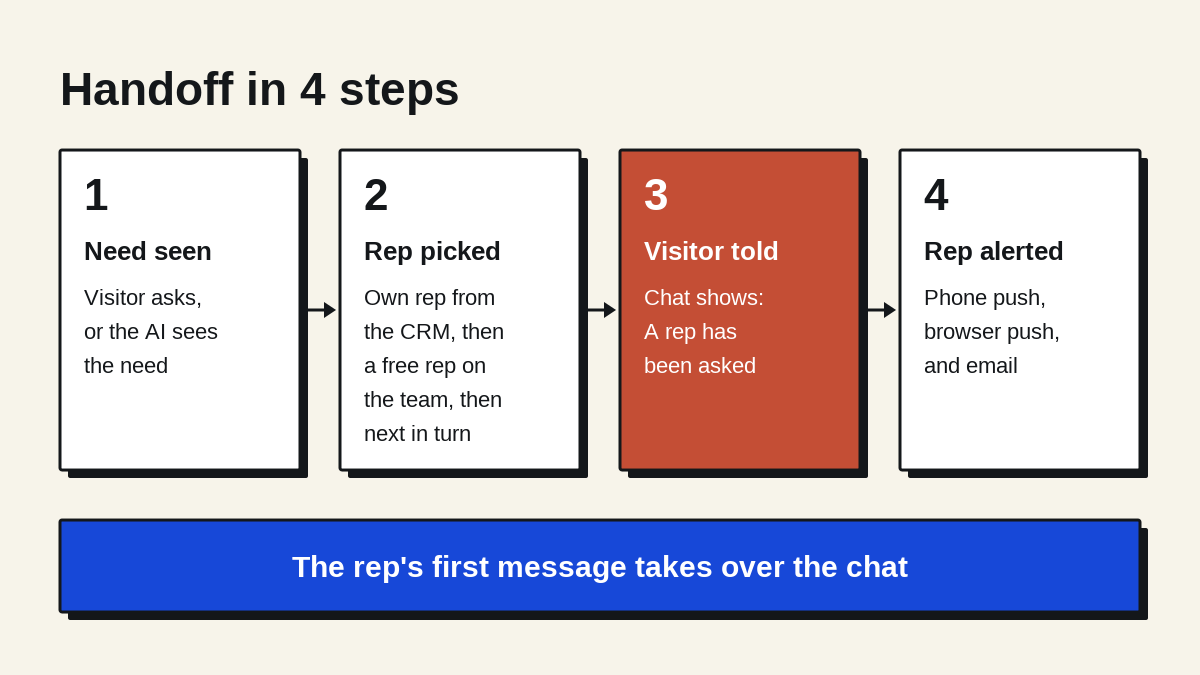
Step 3 is small but it builds trust. A chatbot that says "Sam has joined" before Sam knows about the chat lies to the visitor. "A rep has been asked" is true the moment the AI writes it.
The company can also turn on one option: hold the chat for the customer's own rep. In that case the AI keeps answering until that rep takes over. This suits a business where each customer has a named contact. For each step in full, the rep order and staffing, read human handoff from AI chat. For why the right rep matters, read assigned-rep handoffs need more than routing. The handoff product page has the short version.
How to check what the chatbot says
You should not have to trust a bot. You should be able to look. Memox gives you four ways to look and to step in.
| What you can do | How it helps |
|---|---|
| Read the full chat log | You see what each visitor asked and what the AI said |
| Take over a chat | Your rep steps into any open chat with their own words |
| Send a private note to the AI | A rep steers the AI during a chat, and the visitor does not see the note |
| Choose who gets handoffs | An owner or admin turns "receive handoffs" on or off for each member |
The chat log is the most useful of the four. Read it like a customer service manager reads emails. You find the questions that visitors ask most. You find the answers you would change. You also find the questions where the chatbot did well, and you stop worrying about those.
The private note is a quiet tool. Say a rep joins a chat and sees that the AI quoted a standard delivery time. The rep knows the stock is late this week. The rep sends a private note to the AI. The AI adjusts its next answer, and the visitor never sees the note.
The last row is about people, not about software. Not every team member wants chats in their pocket. The owner or admin decides who receives them. That keeps the handoff with the people who want it.
Your team stays in control. The AI does the first part of the work. Your people do the part that needs a person.
How to add a chatbot to your website, step by step
Many owners ask "how to add a chatbot to a website" and "how to create a chatbot for a website". Both questions have the same short answer. You paste one line of code. The harder part is the knowledge, and the steps below cover it.
- Open the Embed tab. It shows the one line of code for your chatbot.
- Paste the line into your site. You do not rebuild your site. A developer can place it in a minute. If you use a site builder, paste the line where the builder takes custom code.
- Give the chatbot your knowledge. Start with your website, your price rules and your policies.
- Write down your top 10 questions. Take them from your inbox, your phone calls and your own memory. Make sure each one has a correct answer in the knowledge.
One brain for your company.
It answers your customers, your phone and your team. Book a call: we answer your questions live, on your own website.
- Set the brand. Choose your colors and your tone. Pick one of the 5 opening styles.
- Choose the handoff members. Turn on "receive handoffs" for the reps who want chats. Turn it off for the rest.
- Test it. Open your own site. Ask three real questions. Then ask for a person, and check that you see "A rep has been asked".
Steps 1 and 2 take minutes. Steps 3 and 4 decide the quality. Do not skip them. A chatbot on your site with thin knowledge is a fast way to give weak answers.
For a different starting point, read how a URL becomes an AI agent in two minutes. The website chatbot page lists what the chatbot does.
A good first week
A team can run a clean test in 1 week. You do not need a long project. You need a habit: read the chats every day.
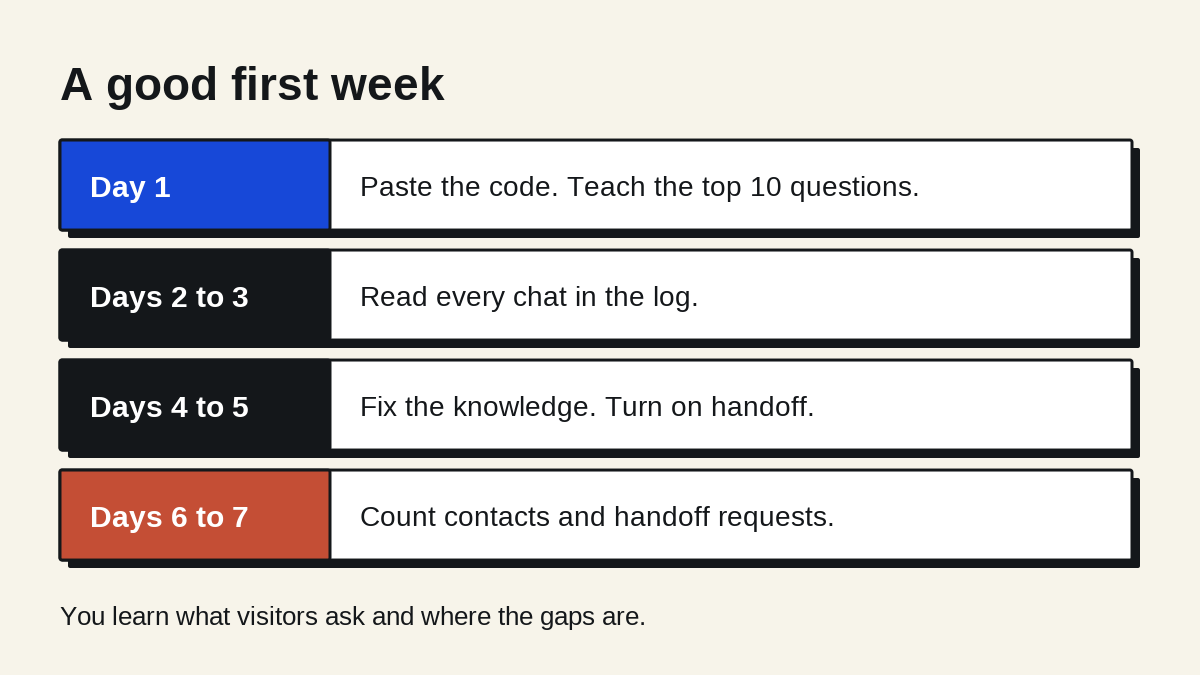
- Day 1. Paste the line of code. Teach the chatbot your top 10 questions.
- Days 2 and 3. Read every chat in the log. Note each answer that you would change.
- Days 4 and 5. Fix the knowledge. Turn on handoff for the reps who want chats.
- Days 6 and 7. Count how many visitors left a name and a contact. Count how many asked for a person.
After a week you know three things. You know what visitors ask. You know where your knowledge has holes. You know if your team likes the handoff.
This is real data from your own site. It is not a promise from a vendor.
You will probably find that the questions are fewer and more repeated than you guessed. A handful of answers cover most chats. The rest are the ones that need a person, and the handoff exists for those.
Book a 30-minute call. We look at where your leads and customer questions come from today. We show Memox answering on your own website, live on the call. You leave with a plan: what we set up first and which of your tools we connect. Book the call
Three worked examples
These three businesses are examples. They show how the chatbot and the handoff work in different settings.
A spare-parts seller
Say a seller of truck parts gets 30 chat visits a week. Most visitors ask about fitment, stock and delivery time.
A visitor writes at 11 pm: "Do you have a brake kit for a 2016 model, and can it arrive by Friday?" The chatbot answers from the seller's stock rules and delivery policy. It says the kit is a standard item and gives the usual delivery time. It asks for a name and a phone number in case the visitor wants to order.
The visitor then writes: "I need to be sure it fits. Can someone check?" The AI sees that the question needs a person. The chat shows "A rep has been asked". The parts rep gets a phone push in the morning with the visitor's name and number. The rep's first message takes over the chat and confirms the fit.
A dental clinic
Say a clinic gets visitors who ask about opening hours, the price of a first visit and whether the clinic takes new patients. The chatbot answers these from the clinic's policies. It asks for a name and a contact so the front desk can book a visit.
One visitor writes about a toothache that started two hours ago. The chatbot does not guess or give medical advice. The clinic's knowledge tells it that urgent pain goes to the front desk. The AI offers a person and the chat shows "A rep has been asked". The front desk rep gets a push and an email with the contact details and calls the patient.
The clinic group's operations lead reads the log at the end of the week. The lead sees that many visitors ask about payment options, and adds a clear answer to the knowledge.
A B2B wholesaler
Say a wholesaler of packaging sells to 200 trade accounts, and each account has a named rep. A buyer from an existing account opens the chat and asks for a price on a large order.
The chatbot answers from the wholesaler's price rules for standard sizes. The buyer asks for a volume discount. That is a decision for a person. The AI looks up the buyer in the CRM and finds the account's own rep. The chat shows "A rep has been asked", and the buyer's own rep gets the push.
The wholesaler turned on the option to hold the chat for the customer's own rep. So the AI keeps helping with simple questions until that rep takes over. The buyer never starts again with a stranger.
A real case: ContainerOne
ContainerOne is an online container dealer. It uses the Memox website chatbot. ContainerOne approved these numbers.
In 30 weeks to 27 Apr 2026, the chatbot had 797 chats and 734 leads. The AI alone handled 90.6% of the chats. There were 75 handoffs, each with a rep assigned.
Read the numbers together. Most chats ended well with no person in them. A small share needed a rep, and each of those had a rep assigned. That is the shape you want: the AI handles the routine, and your people handle the rest. The full story is in the ContainerOne case study.
Choosing a chatbot: 8 questions for any tool
Use the same eight questions for every tool you test. Ask them in a demo, and write down the answers.
| Question | What a good answer looks like |
|---|---|
| What does it answer from? | Your own knowledge, not a guess |
| What does it do when it does not know? | It says so and offers a person |
| Can the visitor ask for a person at any time? | Yes, in one message |
| Who gets the chat? | A rule picks the right rep, such as the customer's own rep |
| What does the visitor see while they wait? | A true status, not a made-up promise |
| Can you read every chat? | Yes, in a full log |
| Can your team take over? | Yes, in any open chat |
| Where do the contact details go? | Into a CRM contact, with no typing |
Run the same ten visitor questions through each tool. Count the wrong answers. A tool with fewer features and no wrong answers beats a tool with more features and a few wrong answers.
Intercom alternatives: chatbot first or phone first?
Some readers arrive here from a search for Intercom alternatives. Whatever tool you compare, judge the category by the eight questions above. Many chat tools were built for support desks with large teams. A mid-sized team needs something lighter: answers from its own knowledge, and a handoff that reaches the right person.
Next, decide where you lose the most leads.
| If you lose leads here | Start with |
|---|---|
| Visitors on your site at night | The website chatbot |
| Calls that go to voicemail | The voice agent |
| Both | The chatbot first, then the phone line, since both use the same knowledge |
If your phone rings more than your site does, start with the phone. Read the AI voice agent for inbound calls for that path.
Where this fits in Memox
The website chatbot is 1 of 5 Memox products. The others are the voice agent, the CRM, handoff to your team and the Memox app. All five run on one brain, so the voice agent answers calls from the same knowledge. Each chat becomes a CRM contact with a stage and a timeline, as a CRM that fills itself explains. For the idea in full, read what a company brain is.
Memox connects to the tools your team uses, such as HubSpot, with a 2-way sync. The Memox team sets each connection up hands-on with you. For the details, read chatbot and CRM integration. For the full picture, see the platform page and the universe.
Common mistakes
- Giving the chatbot thin knowledge. A chatbot with a bare website answers weakly. Add your price rules, your policies and the answers your team gives.
- Never reading the chat log. You find the holes only by reading. Read the log each day in week 1.
- Hiding the way to a person. If a visitor cannot ask for a person, they leave angry. Keep the handoff clear in the chat.
- Sending handoffs to everyone. Reps who do not want chats ignore them. Turn on "receive handoffs" only for the members who want them.
- Promising a rep that is not there. A line such as "Sam has joined" before it is true breaks trust. Use a true status such as "A rep has been asked".
- Skipping the opening line test. One opening line is a guess. Test two, and ship the winner in 1 click.
- Judging by features alone. Judge by wrong answers and by what happens at the handoff. Run your own ten questions.
Your next step
Write down the 10 questions your visitors ask most. The website chatbot page shows where those answers go. To hear the same brain on the phone, call +1 (573) 490-0128, or call in your browser on the demo page.
Book a 30-minute call
- We look at where your leads and customer questions come from today.
- We show Memox answering on your own website, live on the call.
- You leave with a plan: what we set up first and which of your tools we connect.
If it fits, our team does the setup with you. We connect your tools, train the brain on your business and hand you a working system. You do not learn AI.
Each setup is hands-on, so we price it to your business. You get a clear quote after the call.
One brain for your company.
It answers your customers, your phone and your team. Book a call: we answer your questions live, on your own website.
Frequently Asked Questions
Open the Embed tab, copy 1 line of code and paste it into your site. In a site builder, paste it where the builder takes custom code. The chatbot then matches your brand.
Give it your own knowledge: your website, your price rules, your policies and the answers your team gives. Then read each chat in the log and fix the gaps.
The AI picks the customer's own rep first, then a free rep on the same team, then the next free rep in turn. The visitor sees A rep has been asked. The rep gets a phone push, a browser push and an email.
You read every chat in the log, and your team can take over any chat. When the knowledge does not cover a question, the chatbot can say so and offer a person.
Judge any chat tool by two tests: what it answers from, and what happens when a visitor wants a person. The Memox chatbot also shares one brain with a voice agent, a CRM and a team handoff.
Yes. ContainerOne, an online container dealer, uses it. In 30 weeks to 27 Apr 2026 it had 797 chats and 734 leads. The AI alone handled 90.6% of the chats, and there were 75 handoffs, each with a rep assigned.
Your data is hosted in Germany (EU). A data processing agreement (DPA / AVV) is available.